Understand why BM25 matters, install vchord_bm25 and pg_tokenizer, and run your first ranked full-text query.
This is the multi-page printable view of this section. .
vchord_bm25 & pg_tokenizer
Native BM25 ranking index and Block-WeakAnd full-text search for PostgreSQL (
vchord_bm25 & pg_tokenizer).-
1: Getting Started
- 1.1: Overview
- 1.2: Installation
- 1.3: Quick Start
- 2: Usage & Hybrid Search
- 3: Tokenizers (pg_tokenizer)
-
4: Reference & Benchmarks
- 4.1: SQL Reference
- 4.2: GUC & Index Parameters
- 4.3: Benchmarks
- 4.4: Release History & API Evolution
vchord_bm25 (maintained by Pigsty at pgsty/vchord_bm25) is a native PostgreSQL extension built in Rust (pgrx) that implements the Okapi BM25 ranking algorithm and the Block-WeakAnd (Block-Max WAND) Top-K index scan access method inside PostgreSQL.
Paired with pg_tokenizer (maintained by Pigsty at pgsty/pg_tokenizer for customizable multilingual tokenization and vocabulary models) or PostgreSQL’s built-in tsvector analyzer, vchord_bm25 brings Elasticsearch/Lucene-class lexical full-text ranking directly into your relational database—and combines seamlessly with vchord for hybrid semantic + lexical search.
Build bm25 indexes, run Top-K queries, apply WHERE prefilters, and fuse BM25 with VectorChord dense vectors.
Configure text analyzers, stemmers, stopwords, synonyms, HuggingFace models, Chinese Jieba, and Japanese Lindera.
Complete SQL types, operators, functions, GUC parameters, version evolution, and BEIR benchmark results.
Highlights
- True Okapi BM25 Scoring: Supports inverse document frequency (IDF), term frequency saturation (), and quantized 1-byte document length normalization ( and average document length )—solving fundamental relevance limitations of PostgreSQL’s native
ts_rank. - Block-WeakAnd Index Acceleration: Stores compressed posting lists with per-block maximum score upper bounds using delta-bitpacking, skipping non-competitive document blocks during Top-K queries without scanning entire inverted lists.
- Multilingual Tokenization: Works with
pg_tokenizer(llmlingua2,bert_base_uncased,wiki_tocken,gemma2b, custom corpus-trained models, Chinesejieba, Japaneselindera) inv0.1–v0.3, and supports PostgreSQL’s nativetsvectordirectly in the next-generationmainarchitecture. - Native Hybrid Search with VectorChord: Run lexical BM25 (
vchord_bm25) and dense vector search (vchordrq) inside a single SQL query using Reciprocal Rank Fusion (RRF) or ColBERT MaxSim reranking.
1 - Getting Started
Overview, installation, and quick start guide for vchord_bm25 and pg_tokenizer.
Get started with vchord_bm25 in PostgreSQL:
Why BM25 + Block-WeakAnd outperforms native PostgreSQL ts_rank and GIN indexes.
Install vchord_bm25 and pg_tokenizer via Pigsty, Docker, Debian packages, or source.
Tokenize text, build a bm25 index, and run Top-K ranked full-text queries in minutes.
1.1 - Overview
Why VectorChord-BM25 brings native Okapi BM25 and Block-WeakAnd Top-K search to PostgreSQL.
PostgreSQL includes built-in full-text search via tsvector, tsquery, ts_rank, and GIN indexes. While effective for boolean keyword matching (@@), PostgreSQL’s built-in ranking has two structural limitations for modern search and Retrieval-Augmented Generation (RAG) workloads:
- Suboptimal Ranking Formula (
ts_rank): PostgreSQL’sts_rankandts_rank_cddo not track corpus-wide Inverse Document Frequency (IDF) or Average Document Length () across the index. Common words are weighted the same as rare, high-signal terms, and term frequency is not properly saturated. - Exhaustive Index Scans on
ORDER BY ... LIMIT K: A PostgreSQLGINindex only accelerates boolean matching (WHERE tsv @@ tsquery). To return the Top-10 highest-ranked documents, PostgreSQL must fetch every matching row from the heap, computets_rankfor all of them, and sort the entire result set.
How VectorChord-BM25 Solves Both Problems
VectorChord-BM25 (vchord_bm25) introduces a dedicated PostgreSQL index access method (USING bm25) and sparse BM25 scoring operator (<&>) specifically engineered for Top-K lexical retrieval:
| Capability | PostgreSQL Built-in (GIN + ts_rank) |
VectorChord-BM25 (vchord_bm25) |
|---|---|---|
| Ranking Model | Local term frequency / proximity (ts_rank) |
Corpus-wide Okapi BM25 (, , , ) |
| Top-K Execution | Fetch & score all matching tuples, then sort | Block-WeakAnd (Block-Max WAND) early pruning inside the index |
| Posting Compression | Uncompressed or basic varint TID lists | SIMD-friendly Delta-Bitpacking in 128-doc blocks |
| Document Length Norm | Optional crude bitmask flags | 1-byte Fieldnorm Quantization (256-entry lookup table) |
| Query Semantics | Boolean AND/OR match required |
Non-conjunctive Top-K ranking across all query terms |
| Tokenization | Built-in ts_debug / Snowball |
pg_tokenizer (LLM tokenizers, jieba, lindera, custom vocab) or native tsvector |
Architecture Overview
flowchart LR
    subgraph Tokenization["1. Tokenization Layer"]
        T1["Raw Text"] --> T2["pg_tokenizer (v0.1–v0.3)\\nor to_tsvector (main)"]
        T2 --> T3["bm25vector / tsvector\\n(Token IDs + Term Frequencies)"]
    end
    subgraph Index["2. BM25 Index (USING bm25)"]
        I1["Growing Segment\\n(Append-only pages)"] --> I2["Sealed Segment\\n(Delta-Bitpacked 128-doc blocks)"]
        I2 --> I3["Term Statistics (DF)\\n+ 1-Byte Fieldnorm Array"]
    end
    subgraph Query["3. Top-K Query (ORDER BY vec <&> bm25query LIMIT k)"]
        Q1["Block-Max Score Upper Bounds"] --> Q2["Block-WeakAnd Pivot Pruning"]
        Q2 --> Q3["Top-K Heap (-BM25 Score)"]
    end
    T3 --> Index
    Index --> Query
Two API Generations
When working with vchord_bm25, be aware of the two API generations across releases:
-
Stable Releases (
v0.1.0–v0.3.0, schemabm25_catalog):- Uses custom data types
bm25vector(sparsetoken_id:frequencymap, e.g.,{1:1, 2:2}) andbm25query. - Pairs with the
pg_tokenizerextension (tokenizer_catalog), which converts text intoINT[]token ID arrays that cast implicitly tobm25vector. - Index creation:
CREATE INDEX idx ON documents USING bm25 (embedding bm25_ops); - Query construction:
to_bm25query('idx', tokenize('query text', 'tokenizer_name'))
- Uses custom data types
-
Next-Gen Native
tsvectorArchitecture (mainbranch):- Operates directly on PostgreSQL’s built-in
tsvectordata type (CREATE OPERATOR CLASS bm25_ops FOR TYPE tsvector USING bm25), removing the requirement for a separatebm25vectorcolumn. - Index creation:
CREATE INDEX idx ON documents USING bm25 (vector bm25_ops) WITH (options = $$ k1 = 1.2, b = 0.75 $$); - Query construction:
to_bm25query(to_tsvector('english', 'query text'), 'idx')
- Operates directly on PostgreSQL’s built-in
Tip
Both workflows are documented side-by-side throughout this guide so you can use whichever version matches your deployment.
1.2 - Installation
Install VectorChord-BM25 (vchord_bm25) and pg_tokenizer via Pigsty, Docker, Debian packages, or source.
vchord_bm25 supports PostgreSQL 14, 15, 16, 17, and 18 on Linux (x86_64 and aarch64) and macOS.
Method 1: Pigsty / Native OS Packages (Recommended)
Pigsty provides pre-built native RPM and DEB packages for vchord, vchord_bm25, and pg_tokenizer across EL 8/9/10, Debian 12/13, and Ubuntu 22.04/24.04 for PostgreSQL 14–18.
Or install directly via apt / dnf once the Pigsty repository is configured:
Method 2: Docker (tensorchord/vchord-suite)
The official tensorchord/vchord-suite Docker image bundles PostgreSQL, VectorChord (vchord), VectorChord-BM25 (vchord_bm25), and pg_tokenizer out of the box:
Note
You can also pull from GitHub Container Registry using ghcr.io/tensorchord/vchord-suite:pg18-latest (or pg17-latest, pg16-latest, pg15-latest, pg14-latest).
Connect with psql:
Method 3: GitHub Release Packages (.deb & RHEL .zip)
Download prebuilt .deb or RHEL 9+ .zip packages for your PostgreSQL major version (14–18) and CPU architecture (amd64 / x86_64 or arm64 / aarch64) from the GitHub Releases pages of pgsty/vchord_bm25 (upstream supervc-stack/VectorChord-bm25) and pgsty/pg_tokenizer (upstream supervc-stack/pg_tokenizer.rs):
Debian / Ubuntu (.deb)
RHEL 9+ / Enterprise Linux (.zip Archive)
For RHEL 9+ systems when installing manually from the release .zip archive (requires glibc >= 2.34):
Method 4: Build from Source (cargo-pgrx)
To compile pgsty/vchord_bm25 and pgsty/pg_tokenizer from source:
Tip
Optional Lindera Dictionaries at Compile Time: To embed Lindera CJK morphological dictionaries (ipadic, ipadic-neologd, unidic, ko-dic, cc-cedict) directly into pg_tokenizer.so, pass the --features flag when compiling pg_tokenizer:
Development & Debugging (cargo-pgrx)
When developing or debugging vchord_bm25 or pg_tokenizer locally:
Configure PostgreSQL & Enable Extensions
1. Shared Preload Libraries (Optional / Recommended for pg_tokenizer)
If you use pg_tokenizer and want preloaded vocabulary models initialized at server startup, add pg_tokenizer (and vchord if used) to shared_preload_libraries in postgresql.conf:
Restart PostgreSQL after modifying shared_preload_libraries. (vchord_bm25 itself does not require shared_preload_libraries and can be loaded dynamically per session via CREATE EXTENSION.)
2. Create Extensions and Set search_path
Connect to your target database and enable the extensions:
In v0.1.0–v0.3.0, vchord_bm25 installs its objects into the bm25_catalog schema and pg_tokenizer installs into tokenizer_catalog. Add both schemas to your search_path:
Verify the installed version:
1.3 - Quick Start
Run your first BM25 ranked full-text search query in PostgreSQL with vchord_bm25.
This guide walks through creating a table, tokenizing documents, building a bm25 index, and executing Top-K BM25 queries.
Workflow A: bm25vector + pg_tokenizer (v0.1 – v0.3)
In released versions v0.1.0 through v0.3.0, vchord_bm25 pairs with pg_tokenizer to tokenize text into a bm25vector column.
1. Enable Extensions and Configure search_path
2. Create a Tokenizer
Use create_tokenizer with the built-in llmlingua2 (or bert_base_uncased) model:
Tip
Need domain-specific vocabulary, Chinese (jieba), or Japanese (lindera)? See the Tokenizers (pg_tokenizer) section.
3. Create a Table and Populate Documents
4. Tokenize Documents into bm25vector
tokenize(text, tokenizer_name) returns an INT[] array of token IDs, which implicitly casts to bm25vector (aggregating duplicate token IDs into term frequencies):
5. Build the bm25 Index
6. Run Top-K BM25 Queries
Use the <&> operator with to_bm25query(index_name, query_vector) in an ascending ORDER BY clause:
Important
Why is <&> negative?
PostgreSQL only supports index-driven ORDER BY scans in ascending (ASC) order. Therefore, <&> returns the negative BM25 score (e.g., -2.8415). More negative values represent higher relevance, allowing ORDER BY embedding <&> to_bm25query(...) ASC LIMIT K to use the Block-WeakAnd index scan directly. Negate the expression (-(embedding <&> ...)) in SELECT if you want positive scores displayed.
Workflow B: Native tsvector API (main Branch)
In the next-generation main branch rewrite, vchord_bm25 indexes PostgreSQL’s native tsvector type directly—no external tokenizer extension is required for standard languages.
1. Create Extension and Table
2. Build the bm25 Index on tsvector
3. Query with to_bm25query(tsvector, regclass)
2 - Usage & Hybrid Search
Index management, Top-K querying, prefiltering, hybrid search with vchord, and Block-WeakAnd internals.
Learn how to build, tune, and query vchord_bm25 indexes in production:
Create bm25 indexes, tune segment sizes and BM25 parameters (k1, b), monitor parallel builds, and inspect pages.
Run Top-K Block-WeakAnd queries, understand negative BM25 scores, and tune bm25_limit.
Combine WHERE predicates with BM25 ranking using post-filtering, pre-filtering, and partial indexes.
Fuse sparse BM25 lexical search with VectorChord dense vector search via Reciprocal Rank Fusion (RRF) and ColBERT.
Deep dive into the Okapi BM25 formula, 1-byte fieldnorm quantization, delta-bitpacking, and Block-Max WAND.
2.1 - Indexing & Maintenance
Create, configure, maintain, and inspect bm25 indexes in PostgreSQL.
vchord_bm25 provides the bm25 index access method (CREATE ACCESS METHOD bm25 TYPE INDEX HANDLER _bm25_amhandler) and the bm25_ops operator class.
Creating a bm25 Index
Stable Releases (v0.1 – v0.3, bm25vector)
Next-Gen main Branch (tsvector)
In the main branch, bm25_ops operates on tsvector and supports index-level storage parameters (options, limit, and prefilter):
Storage Parameter (WITH (...)) |
Type | Default | Range | Description |
|---|---|---|---|---|
options (k1) |
float (in TOML) |
1.2 |
1.2 – 2.0 |
Term frequency saturation parameter . Higher values increase the weight of repeated occurrences of a term within a document. |
options (b) |
float (in TOML) |
0.75 |
0.0 – 1.0 |
Document length normalization parameter . 0.0 disables length normalization; 1.0 fully normalizes by document length relative to . |
limit |
int |
0 |
0 – 65535 |
Default Top-K search limit stored on the index (used when session GUC bm25.limit = 0). |
prefilter |
bool |
false |
true / false |
Default prefilter behavior stored on the index (can be overridden per session via bm25.prefilter). |
You can dynamically update limit or prefilter on an existing index with ALTER INDEX:
Automatic Tokenization Triggers (v0.1 – v0.3)
When using pg_tokenizer, you can keep your bm25vector column automatically synchronized on INSERT and UPDATE:
Using a Custom Model Trigger (One-Step Helper)
create_custom_model_tokenizer_and_trigger creates a custom model, a tokenizer, backfills existing rows, and attaches an automatic BEFORE INSERT OR UPDATE trigger:
Using a Standard PL/pgSQL Trigger with Pretrained Models
If you use a pretrained model (such as llmlingua2 or bert_base_uncased), create a standard trigger function:
Segment Architecture: Growing vs. Sealed Segments (v0.1 – v0.3)
Internally, vchord_bm25 organizes index tuples into two segment states:
- Growing Segment: Newly inserted tuples (
INSERT/UPDATE) are appended to the growing segment for fast write throughput without re-compressing entire posting lists. - Sealed Segment: When the growing segment exceeds
bm25_catalog.segment_growing_max_page_sizepages (default4096pages, ~32 MB), it is sealed into an immutable, read-only segment with delta-bitpacked 128-document blocks, precomputed block-max upper bounds, and term document frequency statistics.
Parallel Index Build & Progress Monitoring
Index creation supports PostgreSQL parallel maintenance workers and reports live build progress via pg_stat_progress_create_index across three phases:
initializingscanning tablewriting index structures
Inspecting Index Pages (v0.3.0)
Version 0.3.0 provides bm25_page_inspect(index regclass, blkno int) to inspect the internal metadata and page headers of a bm25 index:
Index Constraints & Limitations
- Single-Column Only: A
bm25index can only be created on a singlebm25vector(ortsvector) column. Multicolumnbm25indexes are not supported. - No Unlogged Tables:
UNLOGGEDtables are not supported by thebm25access method (ambuildemptyraisesUnlogged indexes are not supported). - Forward Scan Direction Only:
bm25index scans only support forward (ASC) scan direction on<&>.
2.2 - Querying & Scoring
Execute Top-K BM25 queries, interpret negative BM25 scores, and tune search limits.
Basic Top-K Query Syntax
To run an index-accelerated Top-K BM25 search, use the <&> operator in the ORDER BY clause together with to_bm25query:
Why to_bm25query Requires the Index Name
Unlike vector distance operators (where the distance between two vectors depends only on the two vectors themselves), the BM25 score of a document depends on corpus-wide statistics stored inside the BM25 index:
- Total number of documents in the corpus ()
- Average document length across the corpus ()
- Document frequency of each query token ()
Passing the index ('documents_embedding_bm25'::regclass) into to_bm25query(...) allows the standalone scoring function (search_bm25query / _bm25_evaluate) to read corpus statistics from the index even when PostgreSQL evaluates <&> in the SELECT projection list or during a brute-force sequential scan.
Understanding Negative BM25 Scores
By design, <&> returns negative BM25 scores:
- PostgreSQL’s index access method API (
amcanorderbyop) only supportsORDER BY <operator> ASCfor index-ordered scans. - Because higher BM25 scores mean better relevance, returning $-\text{BM25}(D, Q)$ places the most relevant documents first when sorted in default ascending (
ASC) order. - Never use
ORDER BY embedding <&> to_bm25query(...) DESC—PostgreSQL cannot use the forwardbm25index scan forDESCordering and will either fall back to a full scan or raise a scan direction error.
Tuning bm25_limit vs SQL LIMIT
Because Block-WeakAnd maintains a bounded Top-K min-heap during the index scan to aggressively prune non-competitive posting blocks, the index scanner needs to know (the maximum number of candidates to collect) when the scan begins.
In v0.1.0 – v0.3.0: bm25_catalog.bm25_limit
The GUC bm25_catalog.bm25_limit (default 100, range -1 to 65535) controls the maximum number of Top-K documents returned by the bm25 index scan:
Special values of bm25_catalog.bm25_limit:
| Value | Behavior |
|---|---|
1 – 65535 |
Uses Block-WeakAnd to compute and return up to bm25_limit top-scoring documents (default 100). |
0 |
Immediately returns 0 rows. |
-1 |
Disables Block-WeakAnd Top-K pruning and performs a full brute-force scan over all matching postings in the index. |
In main: bm25.limit and Index limit Reloption
In the main branch, the effective limit is determined in priority order:
- Session GUC
bm25.limit(if> 0) - Index storage parameter
WITH (limit = ...)(if> 0)
Warning
Always ensure bm25_catalog.bm25_limit (or bm25.limit) is greater than or equal to the LIMIT in your SQL query. If your SQL query specifies LIMIT 200 while bm25_limit is 100, the index scan will stop after yielding 100 rows.
Verifying the Query Plan with EXPLAIN
Use EXPLAIN (ANALYZE, BUFFERS) to confirm that PostgreSQL is using Index Scan using ... on documents:
To force a sequential scan + exact brute-force evaluation (useful for verifying recall or debugging), disable the index scan temporarily:
2.3 - Filtered Search & Prefiltering
Combine SQL WHERE clauses with BM25 Top-K ranking using post-filtering, pre-filtering, and partial indexes.
Real-world applications frequently combine full-text BM25 ranking with structured relational filters (such as category_id = 5, tenant_id = 'acme', or date ranges). vchord_bm25 supports three strategies for filtered BM25 search.
1. Post-Filtering vs. Pre-Filtering
When you execute a query with a WHERE clause and ORDER BY embedding <&> to_bm25query(...) LIMIT K:
There are two ways vchord_bm25 can evaluate the WHERE predicate:
Post-Filtering (enable_prefilter = false)
- The
bm25index runs Block-WeakAnd over the entire corpus and returns the global Top-bm25_limitcandidates (e.g., Top 100). - PostgreSQL fetches those 100 heap tuples and applies
WHERE category = 'database'. - Caveat: If only 3 of the global Top-100 documents have
category = 'database', the query returns only 3 rows even if hundreds of other'database'documents exist with slightly lower BM25 scores!
Pre-Filtering (enable_prefilter = true)
When pre-filtering is enabled, vchord_bm25 checks heap visibility and evaluates filter acceptability before pushing candidate documents into the Block-WeakAnd Top-K heap:
- Non-matching documents never enter the Top-K heap and never raise the Block-WeakAnd pruning threshold .
- The index scan continues until it finds documents that both match the
WHEREfilter and have the highest BM25 scores among all matching rows.
Enabling Pre-Filtering
In v0.2.2 – v0.3.0:
In main branch:
2. Partial BM25 Indexes for High-Selectivity Partition Keys
If you frequently filter by a small set of known partition keys (for example, status = 'published' or specific tenant_id values), you can create partial bm25 indexes:
When querying a partial index, reference the partial index’s name in to_bm25query and include the matching WHERE condition:
Choosing the Right Filtering Strategy
| Filter Selectivity | Recommended Strategy | Why |
|---|---|---|
| High selectivity (50%–100% rows match) | Post-filtering (enable_prefilter = false) with slightly higher bm25_limit |
Avoids heap fetches during the inner WAND loop; global Top-100 easily contains 10+ matching rows. |
| Medium selectivity (5%–50% rows match) | Pre-filtering (enable_prefilter = true / bm25.prefilter = true) |
Guarantees exact Top-K recall over filtered rows without scanning irrelevant postings. |
| Fixed tenant / status subset | Partial bm25 index (CREATE INDEX ... WHERE ...) or table partitioning |
Smaller index size, dedicated corpus IDF statistics, and zero wasted checks on other partitions. |
2.4 - Hybrid Search (BM25 + VectorChord)
Combine sparse lexical BM25 search (vchord_bm25) and dense vector search (vchord) with Reciprocal Rank Fusion (RRF) and ColBERT reranking.
Modern retrieval pipelines combine dense vector search (vchord, which captures semantic similarity) with sparse lexical BM25 search (vchord_bm25, which captures exact keyword, identifier, and rare-term matches). Because both extensions run natively inside PostgreSQL, you can execute end-to-end hybrid search in a single SQL query with zero external orchestration.
Schema Setup for Hybrid Search
Method 1: Reciprocal Rank Fusion (RRF) in Pure SQL
Reciprocal Rank Fusion (RRF) combines rankings from multiple retrieval systems without requiring score calibration between L2/cosine distance and BM25 scores:
where is a smoothing constant (typically ).
Method 2: Hybrid Retrieval + ColBERT Late-Interaction Reranking
For even higher accuracy, you can retrieve candidate documents using vchordrq (dense) + vchord_bm25 (lexical) and rerank the union of candidates in PostgreSQL using VectorChord’s @# (max_sim) multivector ColBERT operator:
Tip
See our engineering deep dives Supercharge Vector Search with ColBERT Rerank in PostgreSQL and Hybrid Search with Postgres Native BM25 and VectorChord for full BEIR benchmark comparisons of Dense + BM25 + ColBERT reranking inside PostgreSQL.
2.5 - BM25 & Block-WeakAnd Internals
Mathematical formulation and index architecture of Okapi BM25, 1-byte fieldnorm quantization, delta-bitpacking, and Block-WeakAnd in vchord_bm25.
This page details the exact scoring equations and data structures implemented in vchord_bm25 (crates/bm25/src/bm25.rs and src/algorithm/block_wand.rs).
1. Okapi BM25 Scoring Formula
Given a document and a query with query term frequencies and document term frequencies , vchord_bm25 computes:
Inverse Document Frequency ()
where:
- is the total number of indexed documents in the table.
- is the number of documents containing token (document frequency).
Saturated Term Frequency ()
where:
- is the term frequency of token in document .
- is the quantized document length (total token count in ) decoded from its 1-byte
fieldnormID. - is the average document length across all indexed documents.
- (default
1.2) controls term frequency saturation. - (default
0.75) controls document length normalization.
2. 1-Byte Fieldnorm Quantization (FIELDNORM_TO_LENGTH)
Storing a 32-bit float or integer length for every document and computing floating-point division for every scored posting would consume excessive memory bandwidth and CPU cycles. Instead, vchord_bm25 quantizes document length into a single byte (u8, 0..=255) using the 256-entry FIELDNORM_TO_LENGTH lookup table:
- Exact for short documents (
0–40tokens): Values0..=40map 1:1 to exact token counts. - Logarithmically stepped for longer documents (
41–255): Steps widen progressively (e.g.,42, 44, 46, ...up to2,013,265,944tokens). - 256-Entry Precomputed Score Cache: Because
fieldnormhas only 256 possible values,vchord_bm25precomputes the denominator term for all 256 possible document lengths once per query term:
Scoring a candidate posting during scan execution reduces to a single table lookup and one division:
3. Posting List Compression & Block-WeakAnd (Block-Max WAND)
Fixed 128-Document Blocks with Delta-Bitpacking
For each term in a sealed segment, the inverted list of (doc_id, term_frequency) pairs is partitioned into fixed blocks of 128 documents and compressed with Delta-Bitpacking:
- Document IDs within a block are sorted in ascending order and stored as deltas (), bitpacked using the minimum bit width required by the largest delta in the block.
- Each block header stores the last document ID in the block (for fast shallow seeking) and the Block-Max TF / Fieldnorm pair $(\text{tf}{\max}, \text{fn}{\min})$ that achieves the highest possible BM25 contribution inside that 128-document block.
Block-WeakAnd Top-K Pruning Loop
During an ORDER BY vec <&> to_bm25query(...) LIMIT K scan:
flowchart TD
    A["Sort query term cursors by current doc_id"] --> B["Accumulate upper-bound max_score across cursors\\nuntil sum > current Top-K threshold θ (Pivot Document)"]
    B --> C{"Sum of Block-Max scores\\nat Pivot > θ ?"}
    C -- "No (Prune Block!)" --> D["Skip entire 128-doc block\\nwithout decoding postings"]
    C -- "Yes" --> E{"All leading cursors\\naligned at Pivot doc_id?"}
    E -- "No" --> F["Advance leading cursor to Pivot doc_id"]
    E -- "Yes" --> G["Decode block & evaluate exact BM25 score\\nUpdate Top-K min-heap and raise θ"]
    D --> A
    F --> A
G --> A- Pivot Selection: Query term cursors are ordered by their current
doc_id. Starting from the first cursor,vchord_bm25sums each term’s global upper-boundmax_scoreuntil the cumulative sum exceeds the current -th best score threshold in the Top-K min-heap. The cursor where the sum crosses defines the pivot document. - Block-Max Refinement: Without decompressing any posting block,
vchord_bm25shallow-seeks each cursor up to the pivot’s 128-document block and sums the tighter per-block upper bounds (block_max_score). - Fast Block Skipping: If the sum of
block_max_scorevalues is , no document in the current block intersection can possibly enter the Top-K results—the scanner immediately jumps past the block without decoding document IDs or frequencies. - Exact Evaluation: Only when the block upper bound exceeds and cursors align on
pivot_docdoesvchord_bm25decode the block, verify visibility/deletion bitmap (and optional prefilter), compute the exact BM25 score, and update the Top-K heap.
3 - Tokenizers (pg_tokenizer)
Complete guide to pg_tokenizer: text analyzers, character/token filters, pretrained and custom models, and multilingual tokenization.
pg_tokenizer (maintained by Pigsty at pgsty/pg_tokenizer) is the companion PostgreSQL extension for vchord_bm25 (pgsty/vchord_bm25) that provides full-text analyzers and vocabulary models to convert raw text into integer token ID arrays (INT[]) and sparse bm25vector embeddings.
How Text Analyzers and Models combine to turn raw text into token IDs.
Configure character filters, pre-tokenizers (Unicode, Regex, Jieba), stemmers (30 languages), stopwords, synonyms, and n-grams.
Use built-in models (llmlingua2, bert_base_uncased, wiki_tocken, gemma2b), train custom corpus models, or import HuggingFace & Lindera models.
Ready-to-use configurations for English, Chinese (Jieba), Japanese (Lindera), and custom domain corpora.
3.1 - Tokenizer Architecture & Usage
Understand the two-stage pipeline of pg_tokenizer: Text Analyzer and Tokenization Model.
Two-Stage Tokenization Pipeline
A tokenizer in pg_tokenizer consists of up to two stages that transform a raw TEXT string into an INT[] array of integer token IDs:
flowchart LR
    A["Raw Text\\n(TEXT)"] --> B["Stage 1: Text Analyzer\\n1. character_filters\\n2. pre_tokenizer\\n3. token_filters"]
    B --> C["Normalized Tokens\\n(TEXT[])"]
    C --> D["Stage 2: Model\\nVocabulary Mapping / Subword BPE"]
D --> E["Token ID Array\\n(INT[] → bm25vector)"]- Text Analyzer (
text_analyzer): Splits raw text into aTEXT[]array of normalized string tokens by applying a sequential pipeline of:- Character Filters (
character_filters): Transform the raw string before splitting (e.g.,to_lowercase,unicode_normalization). - Pre-tokenizer (
pre_tokenizer): Splits the string into initial substrings (unicode_segmentation,regex, or Chinesejieba). - Token Filters (
token_filters): Filter or transform individual tokens (skip_non_alphanumeric,stemmer,stopwords,synonym,pg_dict,ngram).
- Character Filters (
- Model (
model): Maps the string tokens (or raw text, for standalone subword models likellmlingua2,bert_base_uncased,gemma2b, HuggingFace, orlindera) into integer token IDs (INT[]).
Note
- Pretrained subword models (
llmlingua2,bert_base_uncased,gemma2b), HuggingFace models, and Lindera models include their own built-in tokenization rules and do not require a separatetext_analyzerstage. - Dictionary/corpus models (
wiki_tockenand custom models created viacreate_custom_model) require atext_analyzerstage to split and normalize text before looking up token IDs in the model’s vocabulary table.
Creating and Using a Tokenizer
All configuration in pg_tokenizer uses TOML format passed as a dollar-quoted string ($$ ... $$).
Option 1: Single-Stage Tokenizer (Built-in Model)
Option 2: Inline Text Analyzer + Model
You can define the text_analyzer pipeline directly inside create_tokenizer:
Option 3: Reusable Named Text Analyzer + Custom Model
You can create a standalone text_analyzer once with create_text_analyzer and reference it across multiple custom models and tokenizers:
Managing Tokenizers
3.2 - Text Analyzers & Filters
Complete configuration reference for character filters, pre-tokenizers, and token filters in pg_tokenizer.
A Text Analyzer processes raw text through three sequential stages:
- Character Filters (
character_filters) — Zero or more character-level transformations on the full text string. - Pre-tokenizer (
pre_tokenizer) — Exactly one splitter that breaks the string into initial tokens. - Token Filters (
token_filters) — Zero or more token-level transformations, expansions, or filters.
Tip
You can test any text analyzer directly using SELECT apply_text_analyzer('Sample text here', 'analyzer1'); to inspect the resulting TEXT[] array before wiring it to a model.
1. Character Filters (character_filters)
to_lowercase
Converts all characters in the input text to lowercase.
unicode_normalization
Applies Unicode Normalization Forms (UAX #15) to standardize composed/decomposed characters, accents, and full-width/half-width variants.
Supported modes:
"nfc"— Normalization Form C (Canonical Decomposition followed by Canonical Composition)"nfd"— Normalization Form D (Canonical Decomposition)"nfkc"— Normalization Form KC (Compatibility Decomposition followed by Canonical Composition)"nfkd"— Normalization Form KD (Compatibility Decomposition)
2. Pre-Tokenizers (pre_tokenizer)
A text analyzer may specify at most one pre_tokenizer.
unicode_segmentation
Splits text on Unicode word boundaries according to the Unicode Standard Annex #29 (UAX #29) specification (via the Rust unicode-segmentation crate). Ideal for space-delimited and Western languages.
regex
Extracts tokens matching a custom regular expression (powered by the Rust regex crate):
jieba (Chinese Word Segmentation)
Segments Chinese text into words using the jieba-rs dictionary and Hidden Markov Model (HMM):
| Parameter | Type | Default | Description |
|---|---|---|---|
mode |
string |
"search" |
"full" (standard jieba.cut), "precise" (jieba.cut_all scanning all dictionary matches), or "search" (jieba.cut_for_search finer-grained segmentation for search recall). |
enable_hmm |
bool |
true |
Enables HMM recognition for out-of-vocabulary words ("full" and "search" modes only). |
3. Token Filters (token_filters)
Token filters run in the exact order listed in your TOML array.
skip_non_alphanumeric
Drops any token that contains no alphanumeric characters (such as standalone punctuation marks ,, ., ! left behind by word segmentation).
stemmer (Snowball Stemming — 30 Languages)
Reduces inflected words to their root stem using the Snowball stemming algorithms.
Supported stemmer values:
| Language | stemmer Value |
Language | stemmer Value |
|---|---|---|---|
| Arabic | arabic |
Lithuanian | lithuanian |
| Armenian | armenian |
Nepali | nepali |
| Basque | basque |
Norwegian | norwegian |
| Catalan | catalan |
Portuguese | portuguese |
| Danish | danish |
Romanian | romanian |
| Dutch | dutch |
Russian | russian |
| English (Porter) | english_porter |
Serbian | serbian |
| English (Porter2) | english_porter2 |
Spanish | spanish |
| Esperanto | esperanto |
Swedish | swedish |
| Estonian | estonian |
Tamil | tamil |
| Finnish | finnish |
Turkish | turkish |
| French | french |
Yiddish | yiddish |
| German | german |
||
| Greek | greek |
||
| Hindi | hindi |
||
| Hungarian | hungarian |
||
| Indonesian | indonesian |
||
| Irish | irish |
||
| Italian | italian |
stopwords
Removes common stopwords that carry little lexical signal.
- Built-in dictionaries:
"lucene_english"— Apache Lucene standard English stopword list"nltk_english"— NLTK standard English stopword list"iso_english"— Stopwords ISO English stopword list
- Custom stopword dictionary: Create your own with
create_stopwords(name, text)(one word per line) and reference it by name.
synonym
Normalizes synonymous terms to a single canonical token. Create a synonym dictionary with create_synonym(name, text) where each line contains space-separated synonyms (all words on a line are replaced by the first word on that line):
pg_dict (PostgreSQL Full-Text Dictionaries)
Delegates token filtering to any existing PostgreSQL Full-Text Search Dictionary (pg_ts_dict, including Simple, Ispell, Snowball, and Synonym dictionaries; note that Thesaurus dictionaries are not supported because they operate on multi-word phrases rather than single tokens):
ngram
Splits each token into character n-grams (useful for substring, prefix, CJK without dictionaries, or code/identifier search):
| Parameter | Type | Default | Range | Description |
|---|---|---|---|---|
min_gram |
int |
1 |
1..=255 (<= max_gram) |
Minimum character length of generated n-grams. |
max_gram |
int |
2 |
1..=255 (>= min_gram) |
Maximum character length of generated n-grams. |
preserve_original |
bool |
false |
true / false |
Whether to also emit the original unsplit token if its length falls outside [min_gram, max_gram]. |
3.3 - Tokenization Models
Pretrained models (llmlingua2, bert_base_uncased, wiki_tocken, gemma2b), custom corpus-trained models, HuggingFace tokenizers, and Lindera models.
In pg_tokenizer, a Model maps string tokens (or raw text) to integer token IDs (INT[]). You can choose from four built-in pretrained models, train a custom vocabulary model directly on your PostgreSQL table, import any HuggingFace tokenizer.json, or use a Lindera morphological model.
1. Built-in Pretrained Models
| Model Name | Source / Architecture | Requires text_analyzer? |
Memory Footprint | Best For |
|---|---|---|---|---|
llmlingua2 |
microsoft/llmlingua-2-xlm-roberta-large-meetingbank (XLM-RoBERTa multilingual subword) |
No (forbidden) | ~200 MB (default preloaded) | Multilingual general text out of the box without training a custom vocabulary. |
bert_base_uncased |
google-bert/bert-base-uncased (WordPiece, 30,522 vocab) |
No (forbidden) | ~15 MB | General English text; fast startup and compact vocabulary. |
wiki_tocken |
Snowolf/wiki-tocken (Built-in English Wikipedia token dictionary) |
Yes (required) | ~30 MB | English full-text search combined with custom stemmers, stopwords, and synonyms. |
gemma2b |
google/gemma-2b (SentencePiece BPE, 256k vocab) |
No (forbidden) | ~100 MB | Code, technical identifiers, and multilingual LLM workloads. |
Example: Using bert_base_uncased or llmlingua2
2. Custom Corpus Models (create_custom_model)
For maximum BM25 accuracy and minimal memory footprint, you can build a custom vocabulary model directly from your own table column. Unlike subword LLM tokenizers (which split rare domain words into multiple sub-tokens), a custom model assigns a dedicated 1:1 integer ID to every unique normalized token produced by your text_analyzer—and weighs only a few megabytes in memory.
Option A: One-Step Helper (create_custom_model_tokenizer_and_trigger)
This convenience function creates the custom model, creates the tokenizer, populates the target bm25vector column for all existing rows, and installs a BEFORE INSERT OR UPDATE trigger that automatically learns new vocabulary tokens and updates the bm25vector column when rows change:
Option B: Step-by-Step (create_custom_model Without Trigger)
If you prefer not to attach an automatic trigger (or want to control when embedding is populated):
3. Importing HuggingFace Tokenizers (create_huggingface_model)
You can import any HuggingFace tokenizers JSON specification (tokenizer.json) into PostgreSQL using create_huggingface_model.
In psql, you can fetch tokenizer.json directly from HuggingFace Hub into a variable using \set and pass it to create_huggingface_model:
Or pass the contents of a tokenizer.json file directly as a dollar-quoted string:
4. Lindera Morphological Models (create_lindera_model)
For East Asian languages such as Japanese, Korean, and Chinese that benefit from morphological dictionary analysis, pg_tokenizer integrates lindera.
Note
If you build pg_tokenizer from source, enable the desired Lindera dictionary features at compile time:
Example configuration using ipadic with iteration mark normalization, NFKC Unicode normalization, character mapping, compound word merging, number normalization, Japanese part-of-speech stop-tags, Katakana stemming, and diacritical mark removal:
5. Model Preloading (add_preload_model)
Large models (llmlingua2 at ~200 MB, gemma2b at ~100 MB, japanese_ipadic) take several seconds and significant RAM to load on first query in each new PostgreSQL backend process. By preloading models during shared_preload_libraries startup, PostgreSQL loads the model once in the postmaster process and shares it across all backend connections via copy-on-write memory (llmlingua2 is preloaded by default):
Restart PostgreSQL after calling add_preload_model(...) (with shared_preload_libraries = 'pg_tokenizer.so' set in postgresql.conf) for preloading to take effect across all backends.
3.4 - Multilingual Recipes & Limitations
Complete tokenization configurations for English, Chinese (Jieba), Japanese (Lindera), and known limitations.
This page provides production-ready tokenization recipes for English, Chinese, and Japanese full-text BM25 search, followed by important operational limitations to keep in mind.
Recipe 1: English with Stemming & Stopwords (wiki_tocken)
Combines Unicode word segmentation, NLTK stopwords removal, and Porter2 stemming with the built-in Wikipedia vocabulary (wiki_tocken):
Recipe 2: English Custom Corpus Model with Trigger
From the upstream pg_tokenizer examples, this workflow builds a domain-specific English vocabulary from your documents table and keeps embeddings updated automatically via trigger:
Recipe 3: Chinese Full-Text Search (jieba + Custom Model)
For Chinese text, combine the jieba pre-tokenizer (mode = "search", enable_hmm = true) with a custom corpus model trained on your table (demonstrated below using passages from Qian Zhongshu’s Fortress Besieged / 《围城》):
Recipe 4: Japanese Full-Text Search (lindera IPADIC)
For Japanese text, create a Lindera IPADIC morphological model with iteration mark normalization, NFKC normalization, Japanese stop-tag filtering, and Katakana stemming (demonstrated below using passages from Natsume Sōseki’s I Am a Cat / 《吾輩は猫である》):
Operational Notes & Known Limitations
- Object Name Validation: All names for tokenizers, text analyzers, models, stopword dictionaries, and synonym dictionaries must contain only alphanumeric characters and underscores (
[A-Za-z0-9_]), and must not start with a digit. - Transaction Rollback & Per-Connection Object Cache: Each PostgreSQL connection caches
tokenizer,text_analyzer,model,stopwords, andsynonymobjects in backend memory (DashMap). Because this in-memory object pool is not tied to PostgreSQL’s transaction rollback callbacks, rolling back a transaction (ROLLBACK) reverts thetokenizer_catalogtables on disk, but the current connection’s in-memory cache still holds the created object. After aROLLBACK, explicitly call the correspondingdrop_*function (or reconnect) to clear the in-memory cache: - Preload Models Across Replicas:
add_preload_modelwrites the preload model list to the local$PGDATA/pg_tokenizerdirectory on the primary node. Because filesystem files outside PostgreSQL relations are not replicated via WAL, you should runadd_preload_modelon read replicas independently if you preload models there. - Memory Consumption of Built-in LLM Models: Models like
llmlingua2(~200 MB),gemma2b(~100 MB), andlinderaconsume significant memory. Always useadd_preload_modelin production so the model is loaded once in the postmaster process rather than duplicated per connection, or prefer a custom corpus model (create_custom_model) which uses only a few megabytes.
4 - Reference & Benchmarks
Complete SQL reference, GUC parameters, benchmarks, and version history for vchord_bm25 and pg_tokenizer.
Complete technical reference for vchord_bm25 and pg_tokenizer:
Complete reference for bm25vector, bm25query, tsvector, <&>, to_bm25query, bm25_page_inspect, and all 19 pg_tokenizer functions.
Session GUCs and index storage parameters across v0.1–v0.3 (bm25_catalog.) and main (bm25.).
QPS and NDCG@10 accuracy comparisons against Elasticsearch, Lucene, ParadeDB, and PostgreSQL GIN.
Changelog and schema evolution from v0.1.0 through v0.3.0 to the next-generation native tsvector architecture.
4.1 - SQL Reference
Complete SQL data types, operators, casts, index access methods, and functions for vchord_bm25 and pg_tokenizer.
vchord_bm25 Data Types
| Data Type | Schema | Versions | Text Representation / Structure | Description |
|---|---|---|---|---|
bm25vector |
bm25_catalog |
v0.1.0 – v0.3.0 |
{token_id:freq, ...} (e.g., {1:1, 2:2, 15:1}) |
Sparse vector mapping 32-bit unsigned token IDs to 32-bit term frequencies. Stored with STORAGE = EXTERNAL. |
bm25query |
bm25_catalog |
v0.1.0 – v0.3.0 |
(index_oid regclass, query_vector bm25vector) |
Composite type pairing a target bm25 index OID with a query bm25vector. |
bm25query |
public / ext schema |
main |
(vector tsvector, index regclass) |
Composite type pairing a query tsvector with a target bm25 index OID. |
bm25vector Literal Syntax (v0.1 – v0.3)
vchord_bm25 Operators
| Operator | Left Arg | Right Arg | Return Type | Versions | Description |
|---|---|---|---|---|---|
<&> |
bm25vector |
bm25query |
real (f32) |
v0.1.0 – v0.3.0 |
Computes the negative BM25 relevance score ($-\text{BM25}(D, Q)$). Supports index-accelerated ORDER BY ... ASC scans using bm25_ops. |
<&> |
tsvector |
bm25query |
float8 (f64) |
main |
Computes the negative BM25 relevance score on native tsvector. Supports index-accelerated ORDER BY ... ASC scans using bm25_ops. |
= |
bm25vector |
bm25vector |
bool |
v0.2.0 – v0.3.0 |
Exact equality comparison between two bm25vector values. |
<> |
bm25vector |
bm25vector |
bool |
v0.2.0 – v0.3.0 |
Inequality comparison between two bm25vector values. |
vchord_bm25 Functions
| Function Signature | Return Type | Versions | Description |
|---|---|---|---|
to_bm25query(index_oid regclass, query_vector bm25vector) |
bm25query |
v0.1.1 – v0.3.0 |
Constructs a bm25query from a bm25 index name/OID and a query bm25vector (or INT[] via implicit cast). |
to_bm25query(index_oid regclass, query_vector int[]) |
bm25query |
v0.3.0+ |
Explicit overload accepting an INT[] token ID array directly. |
to_bm25query(vector tsvector, index regclass) |
bm25query |
main |
Constructs a bm25query from a native tsvector and target bm25 index name/OID. |
search_bm25query(target_vector bm25vector, query bm25query) |
real |
v0.1.0 – v0.3.0 |
Underlying implementation function for bm25vector <&> bm25query. |
_bm25_evaluate(left tsvector, right bm25query) |
float8 |
main |
Underlying implementation function for tsvector <&> bm25query. |
bm25_page_inspect(index regclass, blkno int) |
text |
v0.3.0 |
Returns human-readable diagnostic metadata for block blkno of a bm25 index. |
vchord_bm25 Access Method & Operator Class
| Object | Name | Target Type | Ordering Operator |
|---|---|---|---|
| Access Method | bm25 |
Index | Handler _bm25_amhandler |
| Operator Family | bm25_ops |
USING bm25 |
OPERATOR 1 pg_catalog.<&> FOR ORDER BY float_ops |
| Operator Class | bm25_ops |
bm25vector (v0.1–v0.3) / tsvector (main) |
Default operator class for USING bm25 |
pg_tokenizer Functions (tokenizer_catalog)
All pg_tokenizer functions reside in the tokenizer_catalog schema:
Tokenizer Management & Execution
| Function Signature | Return Type | Description |
|---|---|---|
create_tokenizer(name TEXT, config TEXT) |
void |
Creates a named tokenizer from a TOML configuration string. |
drop_tokenizer(name TEXT) |
void |
Drops an existing tokenizer. |
tokenize(text TEXT, tokenizer_name TEXT) |
INT[] |
Tokenizes text using tokenizer_name and returns an array of integer token IDs (implicitly castable to bm25vector). |
Text Analyzer Management
| Function Signature | Return Type | Description |
|---|---|---|
create_text_analyzer(name TEXT, config TEXT) |
void |
Creates a reusable named text analyzer pipeline (character_filters, pre_tokenizer, token_filters). |
drop_text_analyzer(name TEXT) |
void |
Drops a named text analyzer. |
apply_text_analyzer(text TEXT, text_analyzer_name TEXT) |
TEXT[] |
Runs a text analyzer on text and returns the array of normalized string tokens (useful for debugging). |
Model Management
| Function Signature | Return Type | Description |
|---|---|---|
create_custom_model(name TEXT, config TEXT) |
void |
Trains a custom vocabulary model on an existing table column using a text analyzer. |
drop_custom_model(name TEXT) |
void |
Drops a custom model and its backing vocabulary table. |
create_custom_model_tokenizer_and_trigger(tokenizer_name TEXT, model_name TEXT, text_analyzer_name TEXT, table_name TEXT, source_column TEXT, target_column TEXT) |
void |
Creates a custom model, creates a tokenizer, populates target_column on table_name, and attaches an automatic BEFORE INSERT OR UPDATE trigger. |
create_huggingface_model(name TEXT, config TEXT) |
void |
Imports a model from a HuggingFace tokenizer.json string. |
drop_huggingface_model(name TEXT) |
void |
Drops an imported HuggingFace model. |
create_lindera_model(name TEXT, config TEXT) |
void |
Creates a Lindera morphological analysis model (e.g., ipadic) from a TOML config. |
drop_lindera_model(name TEXT) |
void |
Drops a Lindera model. |
Dictionary & Preload Management
| Function Signature | Return Type | Description |
|---|---|---|
create_stopwords(name TEXT, config TEXT) |
void |
Creates a custom stopword dictionary (one word per line). |
drop_stopwords(name TEXT) |
void |
Drops a custom stopword dictionary. |
create_synonym(name TEXT, config TEXT) |
void |
Creates a custom synonym dictionary (space-separated synonyms per line, mapped to the first word). |
drop_synonym(name TEXT) |
void |
Drops a custom synonym dictionary. |
add_preload_model(name TEXT) |
void |
Registers a model to be preloaded at PostgreSQL server startup (shared_preload_libraries). |
remove_preload_model(name TEXT) |
void |
Removes a model from the startup preload list. |
list_preload_models() |
TEXT[] |
Returns the list of models currently registered for preloading. |
Internal Trigger & Helper Functions (tokenizer_catalog)
| Function Signature | Return Type | Description |
|---|---|---|
apply_text_analyzer_for_custom_model(text TEXT, text_analyzer_name TEXT) |
TEXT[] |
Applies text_analyzer_name and filters out tokens exceeding 2600 bytes (PostgreSQL B-tree UNIQUE index maximum key size) before inserting into a custom model vocabulary table. |
custom_model_insert_trigger() |
trigger |
AFTER INSERT OR UPDATE trigger function that extracts new tokens from the source text column and inserts unseen tokens into tokenizer_catalog."model_<name>". |
custom_model_tokenizer_set_target_column_trigger() |
trigger |
BEFORE INSERT OR UPDATE trigger function installed by create_custom_model_tokenizer_and_trigger that automatically populates NEW.<target_column> = tokenize(NEW.<source_column>, tokenizer_name). |
pg_tokenizer Catalog Tables (tokenizer_catalog)
| Table Name | Columns | Description |
|---|---|---|
tokenizer_catalog.tokenizer |
name TEXT NOT NULL UNIQUE, config TEXT NOT NULL |
Stores registered tokenizer names and their serialized JSON/TOML configuration. |
tokenizer_catalog.text_analyzer |
name TEXT NOT NULL UNIQUE, config TEXT NOT NULL |
Stores standalone reusable text analyzer definitions. |
tokenizer_catalog.model |
name TEXT NOT NULL UNIQUE, config TEXT NOT NULL |
Stores registered custom, HuggingFace, and Lindera model definitions. |
tokenizer_catalog.stopwords |
name TEXT NOT NULL PRIMARY KEY, config TEXT NOT NULL |
Stores built-in (lucene_english, nltk_english, iso_english) and custom stopword dictionaries. |
tokenizer_catalog.synonym |
name TEXT NOT NULL PRIMARY KEY, config TEXT NOT NULL |
Stores custom synonym dictionaries. |
tokenizer_catalog."model_<name>" |
id SERIAL PRIMARY KEY, token TEXT NOT NULL UNIQUE |
Backing vocabulary table created for each custom model <name>, mapping unique normalized tokens to 1-based integer IDs. |
pg_tokenizer TOML Configuration Reference
Tokenizer Options (create_tokenizer)
| Option | Type | Description |
|---|---|---|
text_analyzer |
string (optional) |
Name of a pre-created text_analyzer. If omitted, inline character_filters, pre_tokenizer, and token_filters may be defined directly (when supported by model). |
model |
string (required) |
Name of a built-in model (llmlingua2, bert_base_uncased, wiki_tocken, gemma2b) or a user-created model (custom, huggingface, or lindera). |
Text Analyzer Options (create_text_analyzer)
| Option | Type | Description |
|---|---|---|
character_filters |
array / table |
List of character filters applied to the full string before splitting: to_lowercase, unicode_normalization (nfc, nfd, nfkc, nfkd). |
pre_tokenizer |
string / table |
Single pre-tokenizer that splits the string into initial tokens: unicode_segmentation, regex (Rust regex string), or jieba (mode = "full" | "precise" | "search", enable_hmm = true | false). |
token_filters |
array |
Ordered list of token filters: skip_non_alphanumeric, stemmer (30 Snowball stemmers), stopwords (lucene_english, nltk_english, iso_english, or custom), synonym, pg_dict (any pg_ts_dict except Thesaurus), ngram (min_gram, max_gram in 1..=255, preserve_original). |
Custom Model Options (create_custom_model)
| Option | Type | Description |
|---|---|---|
table |
string (required) |
Target table name containing the source text corpus. |
column |
string (required) |
Source TEXT column name on table used to build the vocabulary. |
text_analyzer |
string (required) |
Name of the text_analyzer used to tokenize column into vocabulary terms. |
4.2 - GUC & Index Parameters
Complete reference of session GUC parameters and index storage options for vchord_bm25.
Stable Releases (v0.1.0 – v0.3.0): bm25_catalog.* GUCs
In versions v0.1.0 through v0.3.0, all session GUC parameters use the bm25_catalog. prefix and can be changed per session or transaction by any user (GucContext::Userset):
| Parameter Name | Type | Default | Valid Range | Description |
|---|---|---|---|---|
bm25_catalog.bm25_limit |
integer |
100 |
-1 .. 65535 |
Maximum number of top-scoring documents to return from a bm25 index scan. Set to -1 to disable Block-WeakAnd pruning and perform an exhaustive brute-force scan; set to 0 to return no rows. Must be your SQL LIMIT. |
bm25_catalog.enable_index |
boolean |
true |
true / false |
Enables or disables the bm25 index scan in the PostgreSQL query planner. Set to false to force a sequential scan with exact search_bm25query evaluation. |
bm25_catalog.enable_prefilter |
boolean |
true |
true / false |
Introduced in v0.2.2. When true, filters out documents that do not satisfy the query/visibility check before inserting them into the Block-WeakAnd Top-K heap. |
bm25_catalog.segment_growing_max_page_size |
integer |
4096 |
1 .. 1000000 |
Maximum size (in 8 KB pages, default 4096 = 32 MB) of the append-only growing segment before it is sealed into a compressed, delta-bitpacked read-only segment. |
Examples (v0.1 – v0.3)
Next-Gen main Branch: bm25.* GUCs & Index Reloptions
In the main branch rewrite, session GUCs use the bm25. prefix and work together with per-index storage parameters (WITH (...)):
Session GUC Parameters (main)
| Parameter Name | Type | Default | Valid Range | Description |
|---|---|---|---|---|
bm25.enable_scan |
boolean |
true |
true / false |
Enables or disables bm25 index scans in the planner. |
bm25.limit |
integer |
100 |
0 .. 65535 |
Maximum number of results returned by a bm25 index scan. If set to 0, falls back to the index’s limit storage parameter. |
bm25.prefilter |
boolean |
false |
true / false |
Enables pre-filtering during bm25 index scans (overrides the index’s prefilter storage parameter when true). |
Index Storage Parameters (WITH (...) in main)
| Storage Parameter | Type | Default | Valid Range | Description |
|---|---|---|---|---|
options |
string (TOML) |
k1 = 1.2, b = 0.75 |
k1: 1.2..2.0b: 0.0..1.0 |
TOML string configuring the Okapi BM25 parameters and for the index. |
limit |
integer |
0 |
0 .. 65535 |
Per-index fallback search limit used when bm25.limit = 0. |
prefilter |
boolean |
false |
true / false |
Per-index default prefilter setting. |
4.3 - Benchmarks
QPS throughput and NDCG@10 retrieval accuracy benchmarks for VectorChord-BM25 against Elasticsearch, Lucene, ParadeDB, and PostgreSQL GIN.
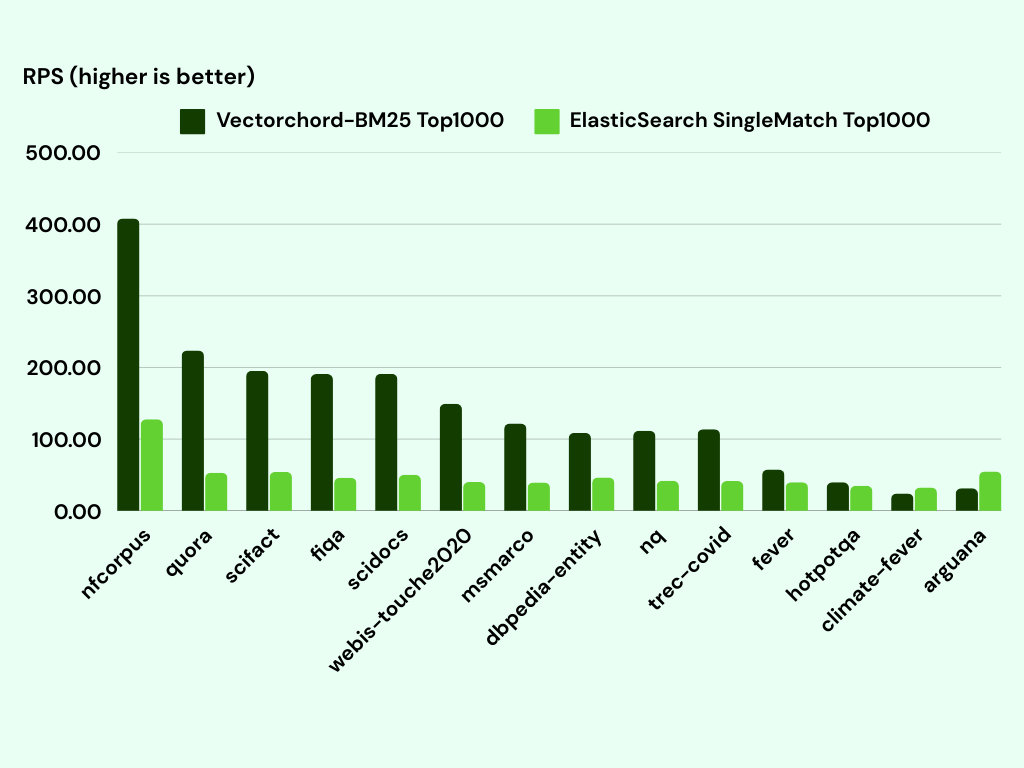
Throughput Benchmark (QPS vs. Elasticsearch, Lucene, ParadeDB, PG GIN)
VectorChord-BM25’s Block-WeakAnd implementation with 128-document delta-bitpacked blocks and 1-byte fieldnorm quantization delivers up to 3x higher QPS than Tantivy-based PostgreSQL extensions (ParadeDB / pg_search) and an order of magnitude higher QPS than native PostgreSQL GIN indexes on Top-10 ranked queries:
Why vchord_bm25 Achieves High QPS
- Zero Cross-Engine Serialization: Unlike foreign-data-wrapper or external Tantivy/Lucene bridges,
vchord_bm25stores its segments directly inside PostgreSQL buffer pages (PostgresRelation), avoiding tuple marshaling overhead. - Aggressive Block-Max Pruning: On multi-term queries, Block-WeakAnd skips over 80%–95% of 128-document posting blocks without decompressing them once the Top-10 threshold stabilizes.
- 256-Entry Precomputed BM25 Lookup Table: Quantizing document length into a 1-byte
fieldnormreplaces expensive per-document floating-point math with a single array lookup.
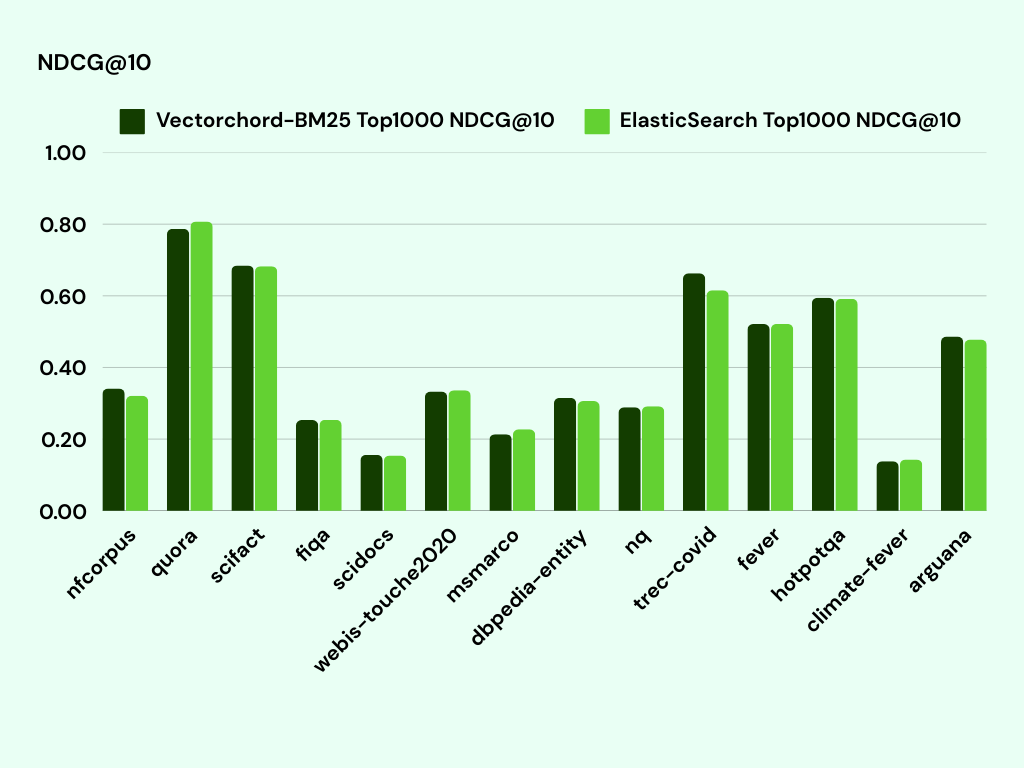
Retrieval Accuracy Benchmark (NDCG@10 on BEIR & LoTTE)
The table below (from our BEIR / LoTTE Hybrid Search & ColBERT Reranking evaluation) compares retrieval accuracy (NDCG@10) across:
- PostgreSQL
vchordDense Vector Search (Vector) - PostgreSQL
vchord_bm25Lexical Search (BM25) - Hybrid Search (
vchord+vchord_bm25with ColBERT Rerank)
| Dataset | Domain | Vector (vchord) |
BM25 (vchord_bm25) |
Hybrid + ColBERT Rerank |
|---|---|---|---|---|
| scifact | Scientific Fact-Checking | 0.676 | 0.665 | 0.751 |
| nfcorpus | Bio-Medical IR | 0.340 | 0.325 | 0.370 |
| fiqa | Financial QA | 0.405 | 0.236 | 0.415 |
| trec-covid | Biomedical COVID-19 | 0.728 | 0.656 | 0.838 |
| LoTTE-lifestyle (search) | Lifestyle QA | 0.735 | 0.635 | 0.779 |
| LoTTE-lifestyle (forum) | Lifestyle Forum | 0.662 | 0.506 | 0.701 |
| LoTTE-recreation (search) | Recreation QA | 0.642 | 0.564 | 0.708 |
| LoTTE-technology (search) | Technology QA | 0.562 | 0.483 | 0.647 |
| LoTTE-writing (search) | Writing QA | 0.726 | 0.674 | 0.793 |
Tip
Combining vchord_bm25 with vchord consistently outperforms either dense vector search or lexical BM25 alone across every evaluated dataset. See Hybrid Search (BM25 + VectorChord) for SQL query templates.
4.4 - Release History & API Evolution
Version changelog and SQL schema evolution of VectorChord-BM25 (vchord_bm25) from v0.1.0 to v0.3.0 and main.
This page tracks the release history and SQL schema evolution of vchord_bm25 (pgsty/vchord_bm25 / supervc-stack/VectorChord-bm25).
Version Summary Matrix
| Version | Schema | Indexed Type | Tokenizer | Key Additions |
|---|---|---|---|---|
main (Next-Gen) |
Extension schema | tsvector |
Native to_tsvector (or custom) |
Complete storage & index engine rewrite on native tsvector; external sort parallel ambuild; index reloptions (options, limit, prefilter); bm25.* GUCs; PostgreSQL 18 support. |
v0.3.0 |
bm25_catalog |
bm25vector |
pg_tokenizer |
Added bm25_page_inspect(regclass, int), to_bm25query(regclass, int[]) overload, and PostgreSQL 18 compatibility. |
v0.2.2 |
bm25_catalog |
bm25vector |
pg_tokenizer |
Added bm25_catalog.enable_prefilter GUC for accurate filtered Top-K BM25 search with WHERE clauses. |
v0.2.1 |
bm25_catalog |
bm25vector |
pg_tokenizer |
Bug fixes for growing/sealed segment transitions and vacuum cleanup. |
v0.2.0 |
bm25_catalog |
bm25vector |
pg_tokenizer |
Added = and <> equality operators on bm25vector and implicit cast CREATE CAST (int[] AS bm25vector) AS IMPLICIT. |
v0.1.1 |
bm25_catalog |
bm25vector |
pg_tokenizer |
Decoupled tokenization into standalone pg_tokenizer extension; changed to_bm25query(regclass, bm25vector) signature. |
v0.1.0 |
bm25_catalog |
bm25vector |
Built-in unicode |
Initial release with bm25vector, bm25query, USING bm25, and Block-WeakAnd Top-K scan. |
Detailed Upgrade Changes
v0.3.0 (sql/vchord_bm25--0.2.2--0.3.0.sql)
- Added page diagnostic function:
- Added
to_bm25query(regclass, int[])convenience overload inmain/late0.3.x.
v0.2.2 (sql/vchord_bm25--0.2.1--0.2.2.sql)
- Added prefiltering support in Block-WeakAnd (
bm25_catalog.enable_prefilterGUC, enabled by default in0.3.0). - Improved MVCC visibility checking during index scans to prevent dead/filtered tuples from polluting the Top-K threshold.
v0.2.0 (sql/vchord_bm25--0.1.1--0.2.0.sql)
- Added
=and<>operators forbm25vector. - Added implicit cast from
int[]tobm25vector(_vchord_bm25_cast_array_to_bm25vector), allowingtokenize(text, name)output (INT[]) to be assigned or passed directly whereverbm25vectoris expected.
v0.1.1 (sql/vchord_bm25--0.1.0--0.1.1.sql)
- Extracted built-in
create_tokenizer/tokenizefunctions into the dedicatedpg_tokenizerextension (tokenizer_catalog), enabling rich text analyzers, Snowball stemmers, stopwords, synonyms, HuggingFace models,jieba, andlindera. - Simplified
to_bm25query(index_oid regclass, query_vector bm25vector)to accept abm25vectordirectly.
Next-Generation Rewrite (main Branch)
- Replaced custom
bm25vectorwith PostgreSQL’s nativetsvector(CREATE OPERATOR CLASS bm25_ops FOR TYPE tsvector USING bm25), allowing users to indexto_tsvector(...)columns directly withUSING bm25. - Added parallel index build (
bm25_parallel_build_main) with external merge sort and constant maintenance memory consumption. - Added configurable BM25 hyperparameters (, ) via
WITH (options = $$ k1 = 1.2, b = 0.75 $$).