This is the multi-page printable view of this section. .
Administration
- 1: Migration
- 2: Scalability
- 3: Kubernetes
1 - Migration
outline: [2,3]
VectorChord Migration Overview
From PGVecto.rs
Most of VectorChord’s vector types are supported by pgvector.
Therefore, migrating from PGVecto.rs to VectorChord is a simple inversion of migrating from pgvector to PGVecto.rs.
We provide migration image modelzai/pgvectors-vchord for pgvecto.rs to VectorChord and vice versa.
Prerequisites
Let’s suppose that you have a table with vector data, and the extension PGVecto.rs installed. A simple example would be:
In addition, some rows will be inserted into the table, as follows:
In most cases, there will also be one or more vector indexes:
This is a typical scenario when PGVecto.rs is used. If the following requirements are met, the migration can be initiated.
- Please note that your
pgvectorandVectorChordextension is not installed in thevectorsschema. This means that you can installpgvectorandPGVecto.rsat the same time.
Steps to Migration
1. Install VectorChord
Please follow the instructions provided to install VectorChord and ensure that the extension is loaded by PostgreSQL.
This will install vectorchord and pgvector at public schema, if other schema is picked, please substitute public with your schema at the migration command.
The two extensions VectorChord and PGVecto.rs are now installed on PostgreSQL, but inside different schemas.
To validate it, please run \dx in psql. You will see that there are 3 extensions:
vectorsforPGVecto.rsat schema vectorsvectorforpgvectorat schema publicvchordforVectorChordat schema public
2. Check existing indexes
For indexes created at vector columns, please retrieve the definition and record it in a convenient location. This information is necessary for the recovery of the indexes at a later stage.
3. Migrate vector columns
To migrate from a PGVecto.rs vector column, the first step is to cast column datatypes between extensions.
Here provides the conversion path for each vector type of VectorChord:
vector(PGVecto.rs) -> real[] -> vector(pgvector)vecf16 -> vector(PGVecto.rs) -> real[] -> halfvecbvector -> vector(PGVecto.rs) -> text[] -> real[] -> bitsvector -> text -> index++ -> text -> sparsevec
For sparse vector type svector, we need additional helper function to finish the casting, see the appendix.
The migration will be completed in one command and no additional memory is required. However, you need to delete the index on the vector column in advance.
This step will cause some downtime, due to:
- a long
ACCESS EXCLUSIVElock byALTER TABLE ALTER COLUMN
4. Recreate index
The next step is to recreate index on vector columns for PGVecto.rs.
For more information on creating index at VectorChord, see indexing.
5. Clean the environment
You may now safely remove the PGVecto.rs extension if it is no longer required.
Appendix: cast of sparse vector
We have discussed most types, but not the sparse vector. It is a little more complicated than other types. Suppose we have a table with a sparse vector column:
Sparse vectors have a different text representation between PGVecto.rs and pgvector: The index starts from 0 in PGVecto.rs and from 1 in pgvector.
For example, a typical sparse vector [-1, 0, 1, 0, 2] has a text representation of:
{0:-1, 2:1, 4:2}/5inPGVecto.rs{1:-1, 3:1, 5:2}/5inpgvector
So we need a helper function to handle this change by processing the string:
After that, the migration can continue smoothly:
2 - Scalability
Background
High queries per second (QPS) vector search is essential for real-time applications such as recommendation engines, image recognition, and natural language processing. These applications demand rapid, efficient searches to deliver immediate results, which is critical for maintaining user engagement and operational effectiveness. By leveraging PostgreSQL for vector search, you not only benefit from its mature, robust relational capabilities and advanced indexing but also avoid the overhead of managing a separate, specialized vector database. This unified approach simplifies integration and reduces system complexity while still meeting the performance needs of modern applications.
Architecture
Using VectorChord on a multi-node cluster is more difficult than on a single machine. As with other services, a reliable distributed vector search usually has the following requirements:
-
Usability: Declarative configuration management
-
Elasticity: Automatic scaling for nodes based on QPS requirements
-
Load Balancing: Requests are handled effectively across different replica instances
-
High Availability: Having multiple copies of the database and automatically recovering from a replica in case of failure
-
Durability: Secure, persistent storage to ensure data integrity and prevent loss in the event of failures
Therefore, we deploy VectorChord services on AWS EKS with OpenTofu and CloudNativePG to manage the infrastructure that provides the above capabilities. Here are some modules to build the example clusters:
-
OpenTofu: Open source alternative of terraform, used for infrastructure as code (IaC) on AWS EKS
-
CloudNativePG: Manage the full lifecycle of a highly available PostgreSQL database cluster with a primary/standby architecture
-
PGBouncer: Lightweight connection pooler for PostgreSQL, provided by module Pooler of CloudNativePG
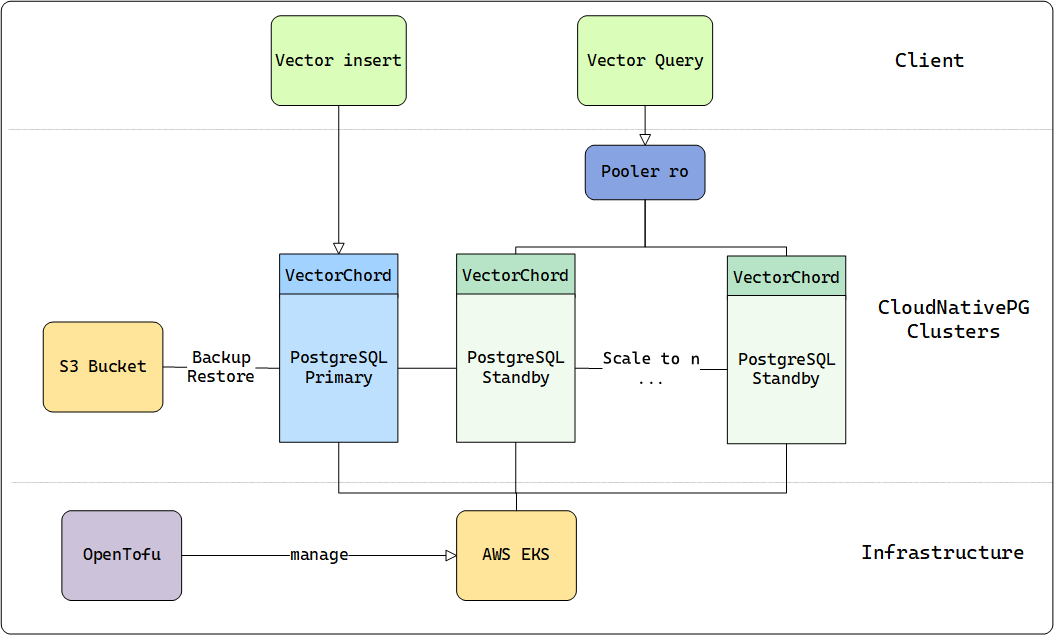
Similar to DiskANN, VectorChord can fully utilize disk resources and still maintain competitive performance when memory is insufficient. Besides, VectorChord can also cache indexes in memory to achieve higher query performance.
For more on the technical details of VectorChord, please see our previous blog.
To reach the QPS limit, we should assume that the memory can fully hold the dataset and select the AWS machine type based on this standard.
In the following table, we provide the appropriate machine which can hold everything in memory for different sizes of datasets:
| dataset | dim / size | machine / memory |
|---|---|---|
| LAION-5m | 768 / 5,000,000 | r7i.xlarge / 32GB |
| LAION-100m | 768 / 100,000,000 | r7i.16xlarge / 512GB |
Results
As outlined in our documentation, VectorChord accepts two key parameters: nprob and epsilon. Here, nprob defines the number of candidate vectors to scan during a query, while epsilon serves as the threshold for determining whether to rerank results. Both parameters play a critical role in influencing both QPS and recall, allowing users to fine-tune the balance between search speed and accuracy.
-
Lower
nprobwill result in higher QPS and lower recall. -
Lower
epsilonwill result in higher but more unstable QPS and lower recall.
If these parameters are fixed, the precision of each experiment will remain consistent. However, the QPS will still vary depending on the CPU and I/O performance of the underlying hardware. To ensure the precision stays above 0.9, we configured the parameters based on earlier experiments conducted with smaller datasets.
| dataset | nprob / epsilon | recall |
|---|---|---|
| LAION-5m | 20 / 1.0 | 0.9324 |
| LAION-100m | 20 / 1.0 | 0.9042 |
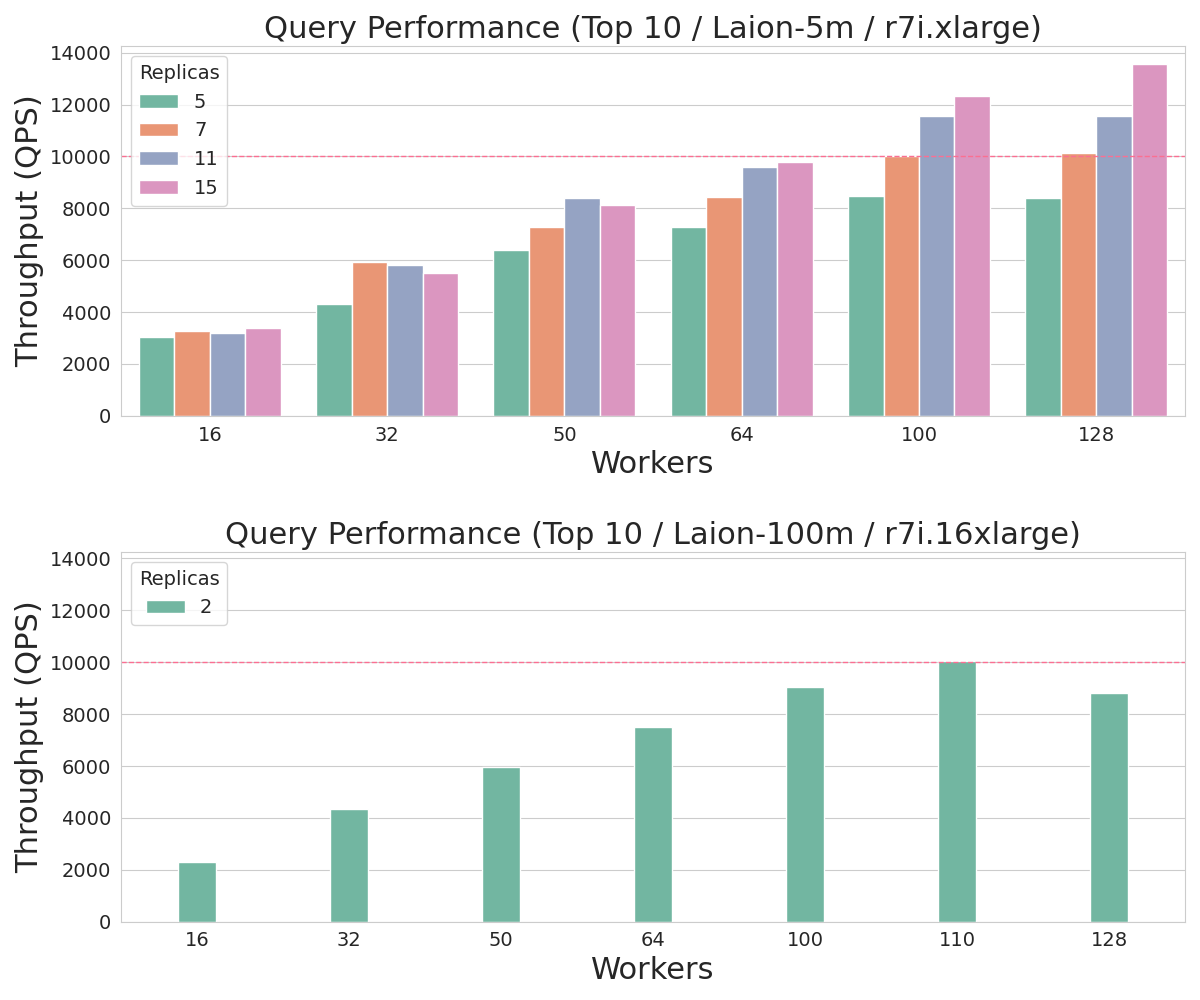
We deployed an r7i.4xlarge instance as the client within the same Availability Zone to query the VectorChord clusters. The clusters were tested with multiple workers ranging from 16 to 128, simulating the concurrency levels typically applied to the database in real-world scenarios. This setup allows us to evaluate how VectorChord performs under varying workloads and concurrency conditions.
With 16 vCPUs, r7i.4xlarge can effectively reduce CPU contention from the client side when the concurrency requests reach up to 128.
In line with common pgbouncer practices, we employed two types of instances: a primary instance for data ingestion and multiple replica instances for read-only workloads. Pgbouncer served as the load balancer, efficiently distributing queries across these backend instances. For the benchmark, we directed our query endpoint to the read-only (ro) pooler, while the read-write (rw) primary instance remained idle during the test. This setup ensures optimal resource utilization and scalability for read-heavy workloads.
For the 5 million dataset, we scaled the number of instances from 5 to 15 to achieve 10,000 QPS. In contrast, for the 100 million dataset, only 2 instances were sufficient to meet the performance standard. The results of these experiments are illustrated in the accompanying figure, demonstrating the scalability and efficiency of VectorChord across different dataset sizes.
Cost
In summary, this is the minimum hardware cost if you need 10000 QPS on such datasets:
| dataset | minimal hardware for 10000+ QPS | number of vcpu | estimate cost per month |
|---|---|---|---|
| LAION-5m | r7i.xlarge × 7 | 4 × 7 = 28 vcpu | $0.2646 × 7 × 720 = $1334 |
| LAION-100m | r7i.16xlarge × 2 | 64 × 2 = 128 vcpu | $4.2336 × 2 × 720 = $6096 |
The cost of the primary instance is excluded from this calculation, as it can be shared and utilized with other PostgreSQL connection poolers, further optimizing resource allocation and reducing overall expenses.
This experiment empowers you to design and scale your own cluster to achieve the ideal level of VectorChord search performance, whether in the public cloud or a private data center. Even in scenarios where performance is the top priority, VectorChord delivers exceptionally competitive pricing, making it a cost-effective solution for high-performance vector search needs.
Summary
Whether you’re launching a startup on a budget-friendly VPS or scaling a large cluster for uncompromised performance, VectorChord opens up unlimited possibilities. While 10,000 QPS is the focus of this post, it’s far from the limit of what VectorChord can achieve.
With its powerful indexing algorithm, VectorChord not only surpasses standard PostgreSQL solutions like pgvector by efficiently utilizing memory and high-speed SSDs, but also outperforms specialized vector databases in handling massive data volumes and high QPS demands. At the same cost, it delivers superior performance while eliminating the complexity of maintaining a separate vector search system.
If you’re eager to explore large-scale vector search solutions, join our Discord community or reach out to us at [email protected]. Let’s unlock the full potential of your data together!
3 - Kubernetes
If you want to use vectorchord in PostgreSQL which is running in Kubernetes, we provide a tutorial to help you. In this tutorial, we will use CloudNative-PG to deploy PostgreSQL cluster in Kubernetes.
Requirements
| Name | Version |
|---|---|
| helm | >= 2.4.1 |
| kubectl | >= 1.14 |
| Kubernetes | >= 1.24.0 |
| Kubernetes (Image Volume Extensions) | >= 1.31.0 |
Install CloudNative-PG
We use CloudNative-PG (cnpg) to deploy PostgreSQL cluster in Kubernetes. You can install it by helm.
PostgreSQL image with vectorchord
In the repository, we already provide a docker image with vectorchord installed. You can find it in ghcr.io/tensorchord/cloudnative-vectorchord. If you want to build your own image, you can use the following Dockerfile as a reference.
Create PostgreSQL cluster
We provide a sample yaml file to create a PostgreSQL cluster in Kubernetes. You can modify it according to your needs. You need pay attention to the following points:
- Set
shared_preload_librariesto loadvchordshared library. - Execute
CREATE EXTENSION IF NOT EXISTS vchord CASCADE;to createvchordextension.
You can install cnpg kubectl plugin to manage your PostgreSQL cluster. Now we can check the status of the cluster.
Notice: This article just provides a minimal configuration, not include logical replication, streaming logical replication, backup and restore, etc. We will provide those in another article. You can also refer to CloudNative-PG for more
Clusterconfiguration.
Connect to PostgreSQL cluster
You can use kubectl port-forward to connect to PostgreSQL cluster.
The vchord extension is installed successfully. You can try quick-start without installation.
Lightweight Extension Images
Managing extensions is one of the biggest challenges when running PostgreSQL on Kubernetes. If you want to add a new extension to this image, you must rebuild the image, back up your PostgreSQL cluster, apply the new image with the added extension, and then restore the cluster. This process reflects the concept of immutable containers in Kubernetes.
Thanks to Andrew Dunstan and Matheus Alcantara, a proposal for PostgreSQL 18 introduces a new configuration option (GUC), extension_control_path, which allows users to specify additional directories for extension control files.
For Kubernetes, the ImageVolume feature allows us to mount a container image as a read-only and immutable volume inside a running pod. This enables PostgreSQL extensions packaged as independent OCI-compliant container images to be mounted inside CloudNativePG clusters at a known directory.
Based on these two features, we can create lightweight vectorchord extension image vchord-scratch.
If you want to use Image Volume Extensions, you need to meet the following requirements:
- Use Kubernetes version 1.31.0 or above (1.33.0 is recommended), and make sure the
ImageVolumefeature gate is enabled. - Use CloudNative-PG helm chart version 0.26.0 or above.
Create PostgreSQL cluster with Image Volume Extensions
You can use the following sample yaml file to create a PostgreSQL cluster with vectorchord extension image. You can modify it according to your needs. You need pay attention to the following points:
- Set
shared_preload_librariesto loadvchordshared library. - Execute
CREATE EXTENSION IF NOT EXISTS vchord CASCADE;to createvchordextension. - Set
extensionsto specify thevchord-scratchextension image. - Set
extension_control_pathanddynamic_library_pathto specify the paths of extension control files and shared library files.
We can check the extension is already installed successfully.
The image ghcr.io/cloudnative-pg/postgresql:18-system-bookworm already contains pgvector, which is required for vchord. However, this image may not include pgvector in future versions, but we have not seen this trend in the short term.