This is the multi-page printable view of this section. .
Use Cases
- 1: Hybrid search with Postgres Native BM25 and VectorChord
- 2: Supercharge vector search with ColBERT rerank in PostgreSQL
- 3: Beyond Text: Unlock OCR-Free RAG in PostgreSQL with Modal & VectorChord
| Title | Description | Link | Code |
|---|---|---|---|
| Hybrid search with Postgres Native BM25 and VectorChord | This article explores how to implement Hybrid Search in Postgres using VectorChord-bm25 for keyword-based retrieval and VectorChord for semantic search. | Hybrid Search | Github Repo |
| Supercharge vector search with ColBERT rerank in PostgreSQL | This blog will demonstrate using the PostgreSQL extension VectorChord and pgvector with ColBERT rerank. | ColBERT Rerank | Github Repo |
| Beyond Text: Unlock OCR-Free RAG in PostgreSQL with Modal & VectorChord | This post is your guide to building exactly that: an OCR-free RAG system directly within your familiar PostgreSQL database. We’ll leverage the power of the ColQwen2 Vision Language Model, the efficiency of VectorChord for multi-vector search in Postgres, and the scalability of Modal for GPU-powered embedding generation. | OCR-Free RAG | Github Repo |
1 - Hybrid search with Postgres Native BM25 and VectorChord
In the era of RAG (Retrieval-Augmented Generation), efficiently retrieving relevant data from vast datasets is crucial for businesses and developers. Traditional keyword-based retrieval methods, such as those utilizing BM25 as a scoring mechanism, excel in ranking documents based on term frequency and exact keyword matches. This makes them highly effective for structured queries and keyword-heavy content. However, they struggle with understanding synonyms, contextual nuances, and semantic intent. Conversely, vector-based retrieval captures deep semantic meaning, enabling better generalization across varied queries but sometimes sacrificing precision in exact keyword matches. Hybrid Search bridges this gap by combining BM25’s precision with vector search’s contextual understanding, delivering faster, more accurate, and semantically aware results.
This article explores how to implement Hybrid Search in Postgres using VectorChord-bm25 for keyword-based retrieval and VectorChord for semantic search. By leveraging VectorChord-bm25’s BM25 ranking with the Block-WeakAnd algorithm and VectorChord’s advanced vector similarity capabilities, you can build a robust search system that seamlessly integrates keyword precision with semantic understanding. Whether you’re building a recommendation engine, a document retrieval system, or an enterprise search solution, this guide will walk you through the steps to unlock the full potential of hybrid search.
All related benchmark codes can be found here.
Hybrid Search Explained
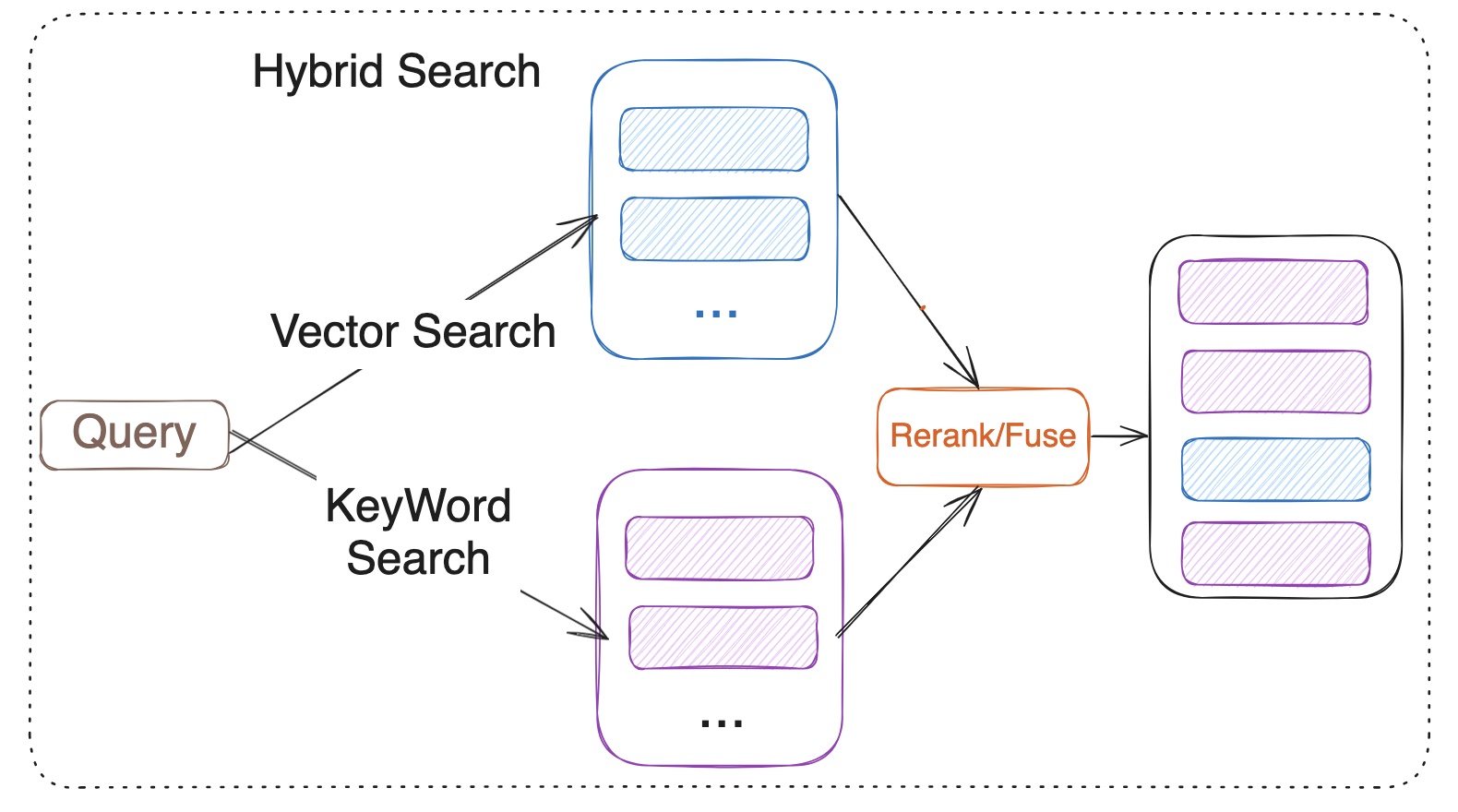
Hybrid Search merges the results from vector search and keyword search. Vector search is based on the semantic similarity between the query and the documents, while keyword search relies on the BM25 ranking algorithm. However, it is important to note that BM25 itself is only responsible for scoring documents, while the broader keyword search process also includes steps such as tokenization, indexing, and query parsing. Hybrid Search utilizes reranker or fuses the results from both methods. Fuses include RRF (Reciprocal Rank Fusion) or weighted scoring for multiple recall strategies. Model-based rerank includes cross encoder models like bge-reranker-v2-m3 and multi-vector representation model ColBERT.
What is the VectorChord?
You may be familiar with pgvector, an open-source vector similarity search extension for Postgres. However, scalable or performance-critical scenarios may require a more advanced vector search solution. VectorChord is an excellent choice.
Check out the blog post “VectorChord: Store 400k Vectors for $1 in PostgreSQL” to learn more about its motivation and design.
What is VectorChord-BM25
VectorChord-BM25 is a PostgreSQL extension for keyword search. It not only implements BM25 ranking but also includes a tokenizer and a Block-WeakAnd index to improve speed.
What is BM25?
BM25 (Best Matching 25) is a probabilistic ranking function used in information retrieval to assess how well a document matches a query. It calculates relevance scores based on term frequency (TF) and inverse document frequency (IDF), while also applying document length normalization. The formula ensures that terms appearing frequently within a document (TF) and those rare across the corpus (IDF) are appropriately weighted, improving search accuracy and relevance. IDF measures how often a word appears across the document collection. The fewer the occurrences, the higher its value. TF represents the frequency of a specific word from the query appearing in the given document. A higher TF indicates a stronger relevance between the query and the document.
Why a Postgres native BM25 Ranking implementation is needed?
In our previous blog post, VectorChord-BM25: Revolutionizing PostgreSQL Search with BM25 Ranking — 3x Faster Than Elasticsearch, my colleague Allen has already provided a detailed and sufficient explanation, which can be referred to.
Tutorial: Use VectorChord-BM25 and VectorChord implement Hybrid Search
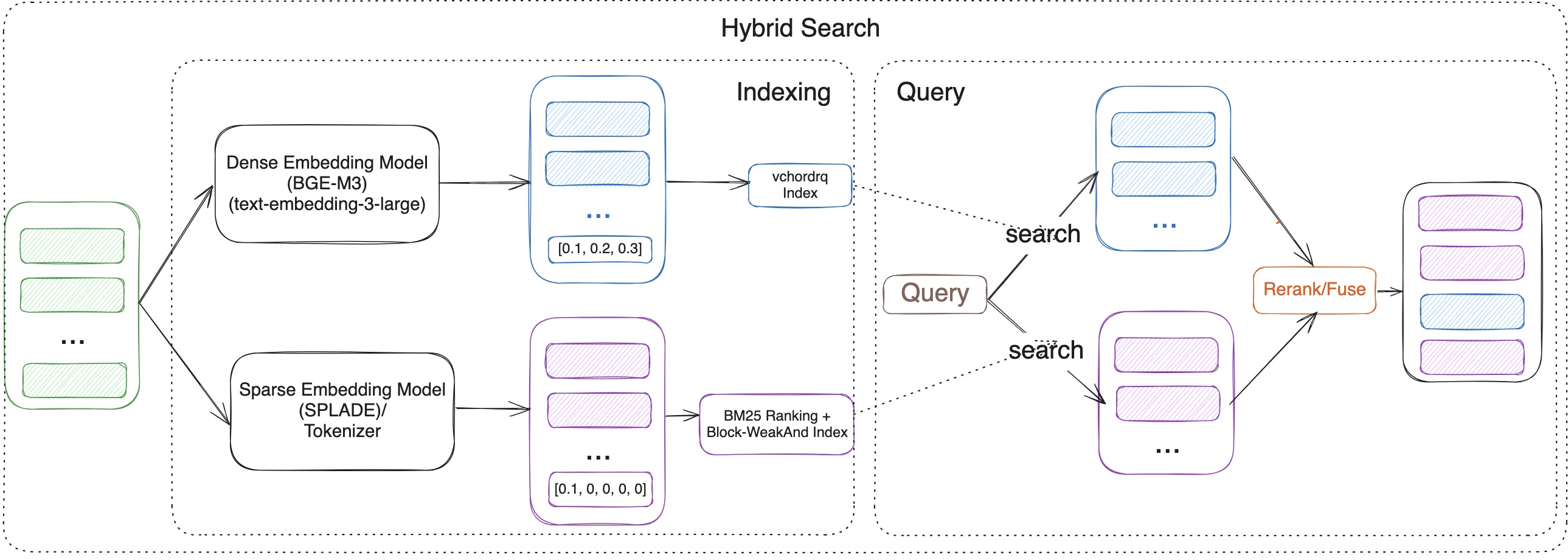
In this tutorial, we will guide you through the steps to implement Hybrid Search using VectorChord-BM25 and VectorChord in PostgreSQL. We will cover the following topics:
-
Semantic Search with VectorChord
-
Keyword Search with VectorChord-BM25
-
Rerank
Prerequisites
- Postgres with VectorChord-BM25 and VectorChord
If you want to reproduce the tutorial quickly, you can use the tensorchord/vchord-suite image to run multiple extensions which are provided by TensorChord.
You can run the following command to build and start the Postgres with VectorChord-BM25 and VectorChord.
- Prepare the Embedding Model and Data
For embedding, we can use a pre-trained embedding model like BGE-M3 to generate embeddings for the documents. BGE-M3 is a high-quality embedding model known for its versatility in multi-functionality, multi-linguality, and multi-granularity.
For validation, we use the BEIR dataset, a heterogeneous benchmark for information retrieval. It is easy to use and allows you to evaluate your models across 15+ diverse IR datasets.
First, you need to load your data into PostgreSQL. Then you can use the following SQL query to generate embeddings for the documents.
For embedding:
The data process and embedding generation code can be found here.
Semantic Search with VectorChord
For semantic search, we utilize the RaBitQ algorithm, which is highly optimized in the VectorChord PostgreSQL extension. RaBitQ is a quantization algorithm for high-dimensional spaces, designed to improve the storage and retrieval efficiency of high-dimensional data, such as embedded vectors.
It achieves this by mapping high-dimensional vectors to a low-dimensional discrete space while preserving the similarity information of the original vectors. This process reduces storage requirements and computational costs while maintaining high retrieval accuracy.
If you find that building the index on your own dataset is too slow, you can utilize external build to accelerate the process. For more details, please refer to our previous blog: Benefits and Steps of External Centroids Building in VectorChord.
Once the index is built, you can use the following SQL query to search for similar documents:
Key-Word Search with VectorChord-BM25
For keyword search, we need to use a tokenizer to convert the text into a BM25 vector, which is similar to a sparse vector that stores the vocabulary ID and frequency.
Let me explain this operation in detail. The tokenize function is used to tokenize the text with the specified tokenizer. In this case, we used the Unicode tokenizer. The output of the tokenize function is a BM25 vector, which is a sparse vector that stores the vocabulary ID and frequency of each word in the text. For example, 1035:7 means the word with vocabulary ID 1035 appears 7 times in the text.
After creating the index, you can calculate the BM25 score between the query and the vectors. Note that the BM25 score is negative, meaning that the higher the score, the more relevant the document is. We intentionally make it negative so that you can use the default ORDER BY to retrieve the most relevant documents first.
Rerank/Fuse
Once you obtain the results from both semantic search and keyword search, you can use a fuse or rerank process to merge the results.
- Fuse (Reciprocal Rank Fusion (RRF))
The advantage of RRF lies in its independence from specific score units; it is based on ranking for fusion, making it suitable for sorting systems with different scoring criteria.
Among them:
-
dis the document. -
nis the number of ranking systems. -
rankis the ranking in the sorting system. -
kis the adjustment parameter, the value is usually 60 (empirical value), used to control the impact of ranking on scores.
- Cross-Encoder model Rerank
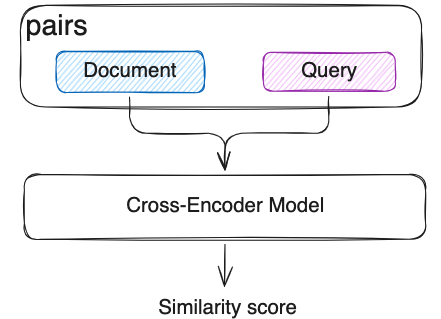
In semantic search, we already use Bi-Encoder vectorized the documents and queries separately. But this independent encoding leads to a lack of interaction between the query and the document. Cross-Encoder model will input the query and document as a whole into the model, the model will see the content of both at the same time, capturing the fine-grained semantic relationship between them through the Transformer layer. Compared with RRF, Cross-Encoder model can capture the fine-grained semantic relationship between the query and the document, and it can be more accurate but slower.
Evaluation
We have tested the NDCG@10 with those methods on several BEIR datasets. Here are the top10 results:
| Dataset | Semantic Search | BM25 | Cross-Encoder Rerank | RRF |
|---|---|---|---|---|
| FiQA-2018 | 0.40343 | 0.25301 | 0.42706 | 0.37632 |
| Quora | 0.88433 | 0.78687 | 0.89069 | 0.87014 |
| SCIDOCS | 0.16055 | 0.15584 | 0.17942 | 0.17299 |
| SciFact | 0.57631 | 0.68495 | 0.74635 | 0.67855 |
The table above demonstrates several conclusions:
-
Compared to BM25 and semantic search, the cross-encoder model rerank can significantly improve search performance across different datasets.
-
On some datasets, RRF may lead the performance decrease. Please conduct verification tests before deciding whether to use RRF. If effective, choosing RRF will be a very economical choice, as it is much, much faster than reranking with the cross-encoder model, and almost no resource consumption.
All related benchmark codes can be found here. If you have any questions, please feel free to contact us on Discord or email us at [email protected].
Future Work
The results highlight the great potential of the hybrid search method. In the future, we will focus on the following aspects to advance RAG:
- Improve the reranking method: Explore the other model-based rerank, such as ColBERT or ColPali, to enhance reranking performance.
- Integrate graph search: Investigate the use of the Apache AGE extension for graph search and integrate it with the hybrid search method to further improve search performance.
References
- https://github.com/pgsty/vchord
- https://github.com/pgsty/vchord_bm25
- https://techcommunity.microsoft.com/blog/adforpostgresql/introducing-the-graphrag-solution-for-azure-database-for-postgresql/4299871
- https://www.pinecone.io/learn/hybrid-search-intro/
- https://www.pinecone.io/learn/series/rag/rerankers/
- https://blog.vespa.ai/improving-zero-shot-ranking-with-vespa-part-two/
2 - Supercharge vector search with ColBERT rerank in PostgreSQL
Traditional vector search methods typically employ sentence embeddings to locate similar content. However, generating sentence embeddings through pooling token embeddings can potentially sacrifice fine-grained details present at the token level. ColBERT overcomes this by representing text as token-level multi-vectors rather than a single, aggregated vector. This approach, leveraging contextual late interaction at the token level, allows ColBERT to retain more nuanced information and improve search accuracy compared to methods relying solely on sentence embeddings.
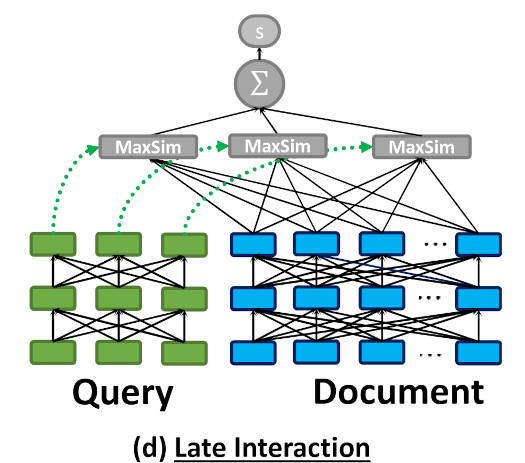
As illustrated in the above image, ColBERT encodes each document/query into a list of token vectors and computes the MaxSim during the query time.
Token-level late interaction requires more computing power and storage. This makes using ColBERT search in large datasets challenging, especially when low latency is important.
One possible solution is to combine sentence-level vector search with token-level late interaction rerank, which leverages the efficiency of approximate vector search and the high quality of multi-vector similarity search.
The multi-vector approach is not limited to pure text retrieval tasks; it can also be used in visual document understanding. For multimodal retrieval models, state-of-the-art models like ColPali and ColQwen directly encode document images into multi-vectors and demonstrate stronger performance compared to OCR-to-text approaches.
This blog will demonstrate using the PostgreSQL extension VectorChord and pgvector with ColBERT rerank.
Tutorial
Assume we already have the documents, let’s create a table to store all of them:
Here we created a table with sentence-level embedding and token-level embeddings.
There are numerous embedding APIs and open-source models. You can choose the one that fits your use case.
For token-level embedding:
ColBERT model produces 128-dim vectors by default.
To insert the data:
For the vector search part, we can use VectorChord to build a high-performance RaBitQ index:
To speed up the indexing building process, we can utilize the external centroids build. Check “Benefits and Steps of External Centroids Building in VectorChord” for more details.
Now, we can query the PostgreSQL:
To support MaxSim rerank, we’ll need to create a function:
Now, we can rerank the documents retrieved by vector search:
Evaluation
We have tested this method on several BEIR datasets. Here are the results:
| Dataset | Search NDCG@10 | Rerank NDCG@10 |
|---|---|---|
| fiqa | 0.23211 | 0.3033 |
| quora | 0.31599 | 0.3934 |
This shows that ColBERT reranking can significantly enhance the results of vector searches.
All the related benchmark codes can be found here.
Future work
Vector search and full-text search with ColBERT rerank can further improve performance. We’re also working on the PostgreSQL BM25 extensions. Stay tuned.
References
3 - Beyond Text: Unlock OCR-Free RAG in PostgreSQL with Modal & VectorChord
Building effective Retrieval-Augmented Generation (RAG) systems for documents often feels like wrestling with messy, complex pipelines. Especially when dealing with PDFs or scanned images, traditional methods rely heavily on Optical Character Recognition (OCR) and layout analysis. These steps can be slow, error-prone, and often lose crucial visual context like tables, figures, and formatting. But what if you could query documents based on how they look, not just the extracted text?
This post is your guide to building exactly that: an OCR-free RAG system directly within your familiar PostgreSQL database. We’ll leverage the power of the ColQwen2 Vision Language Model, the efficiency of VectorChord for multi-vector search in Postgres, and the scalability of Modal for GPU-powered embedding generation. Get ready to simplify your RAG stack and potentially boost your retrieval accuracy, all without complex pre-processing.
We’ll cover:
-
What ColQwen2 is and why it’s a game-changer.
-
How VectorChord makes advanced vector search possible in Postgres.
-
A step-by-step tutorial to build and evaluate the system.
What is ColQwen2? The Power of Visual Understanding
To grasp ColQwen2, let’s first look at its foundation: ColPali. As introduced in the paper “ColPali: Efficient Document Retrieval with Vision Language Models”, ColPali represents a novel approach using Vision Language Models (VLMs). Instead of relying on imperfect OCR, it directly indexes documents using their rich visual features – text, images, tables, layout, everything the eye can see.
Think about the limitations of traditional OCR: complex layouts get mangled, tables become gibberish, and images are often ignored entirely. It’s like trying to understand a book by only reading a flawed transcript. ColPali avoids this by using a powerful VLM (originally PaliGemma) to create embeddings that capture the document’s holistic visual nature. Two key concepts make it shine:
-
Contextualized Vision Embeddings: Generating rich embeddings directly from the document image using a VLM.
-
Late Interaction: This clever technique allows the query’s textual meaning to directly interact with the document’s detailed visual features at search time. It’s not just matching text summaries; it’s comparing the query concept against the visual evidence within the document page.

The ColPali architecture (Image from the ColPali paper)
ColQwen2 builds upon this powerful ColPali architecture but swaps the underlying VLM for the more recent Qwen2-VL-2B. It generates ColBERT-style multi-vector representations, capturing fine-grained details from both text and images. As seen on the vidore-leaderboard, ColQwen2 delivers impressive performance with practical model size.
How Does VectorChord Enable ColQwen2 in Postgres?
This is where VectorChord becomes the crucial piece of the puzzle, bringing this cutting-edge VLM capability into your PostgreSQL database. ColQwen2 (and ColPali) relies heavily on those multi-vector representations and the Late Interaction mechanism, specifically requiring an efficient MaxSim (Maximum Similarity) operation.
Calculating MaxSim – finding the highest similarity score between any vector in the query set and any vector in the document set – can be computationally brutal, especially across millions of document vectors. VectorChord tackles this head-on:
-
Native Multi-Vector Support: It’s designed from the ground up to handle multi-vector data efficiently within Postgres.
-
Optimized MaxSim: Drawing inspiration from the WARP paper, VectorChord uses techniques like dynamic similarity imputation to dramatically speed up MaxSim calculations, making large-scale visual document retrieval feasible.
-
Hybrid Search Ready: Beyond multi-vector, it also supports dense, sparse, and hybrid search (check out our previous post!).
-
Scalable & Disk-Friendly: Designed for performance without demanding excessive resources.
In short, VectorChord transforms PostgreSQL into a powerhouse capable of handling the advanced vector search techniques required by models like ColQwen2 or ColPali.
Tutorial: Building Your OCR-Free RAG System
Alright, theory’s great, but let’s roll up our sleeves and build this thing! We’ll walk through setting up the environment, processing data using Modal for scalable embedding generation, indexing into VectorChord within Postgres, and finally, evaluating our shiny new OCR-free RAG system.
Prerequisites
Before we start, ensure you have:
-
A PostgreSQL instance (Docker recommended) with the VectorChord extension installed OR a VectorChord Cloud cluster.
-
A Modal account (free tier available). Modal’s fast GPU provisioning and scaling are perfect for the embedding generation step. To efficiently process a large volume of documents using the ColQwen2 model, it’s crucial to leverage Modal’s rapid startup and GPU expansion features. This approach will significantly reduce the time required for local processing.
If you want to reproduce the tutorial quickly, you can use the tensorchord/vchord-suite image to run multiple extensions that TensorChord provides.
You can run the following command to build and start Postgres with VectorChord-BM25 and VectorChord.
Set up Modal:
Step 1: Load the Data (Using Modal Volumes)
We’ll use the ViDoRe Benchmark dataset. To handle this data efficiently across potentially distributed Modal functions, we’ll download it to a Modal Volume. Volumes provide persistent, shared storage ideal for this ‘download once, process many times’ scenario.
Modal offers a straightforward Python API for interacting with its platform. With modal.Image, you can set the base image for the Modal App, and the function decorator helps define the function to be executed within the Modal application. To download the dataset to the Modal Volume, execute the following command. Modal will then automatically build the Docker image and promptly launch the container to run your function.
Run the download function:
Modal handles building the environment and running the script in the cloud.
Step 2: Process Data & Generate Embeddings (With Modal & ColQwen2)
This is the heavy lifting: converting document images into ColQwen2 multi-vector embeddings. Doing this locally for many documents would be slow. Modal shines here:
-
Easy GPU Access & Autoscaling: Launch a ColQwen2 model service on Modal and use it to generate the image embeddings and query embeddings for the dataset. The decision to implement an HTTP service instead of using the SDK directly was made to ensure seamless auto-scaling during large-scale embedding operations. If you want to deploy the embedding service as a persistent web endpoint, you can directly change
modal.clstomodal.web_serverfor ColPaliServer and runningmodal deploy. -
Recovery: We checkpoint progress to a separate Modal Volume, allowing us to resume embedding generation if interrupted.
Generate the embeddings:
Step 3: Create Index in VectorChord (Using Vechord SDK)
With embeddings generated and saved in a Modal Volume, we first need to bring them local.
Now, we’ll use the vechord SDK to load these embeddings into our PostgreSQL database and create the necessary multi-vector index. vechord provides a Pythonic, ORM-like way to interact with VectorChord in Postgres.
%[https://github.com/tensorchord/vechord]
Run the indexer script, vechord handles table creation, index creation, and data insertion.
Step 4: Evaluation - Does it Work?
The final step is crucial: evaluating retrieval performance. Does this OCR-free system deliver accurate results, and can it be fast? We’ll use vechord to run queries against our indexed data and look at NDCG@10 and Recall@10. We’ll also test the impact of VectorChord’s WARP optimization, which accelerates MaxSim calculations. In this tutorial, we will use vidore/arxivqa_test_subsampled dataset for evaluation queries, the data are shown below.
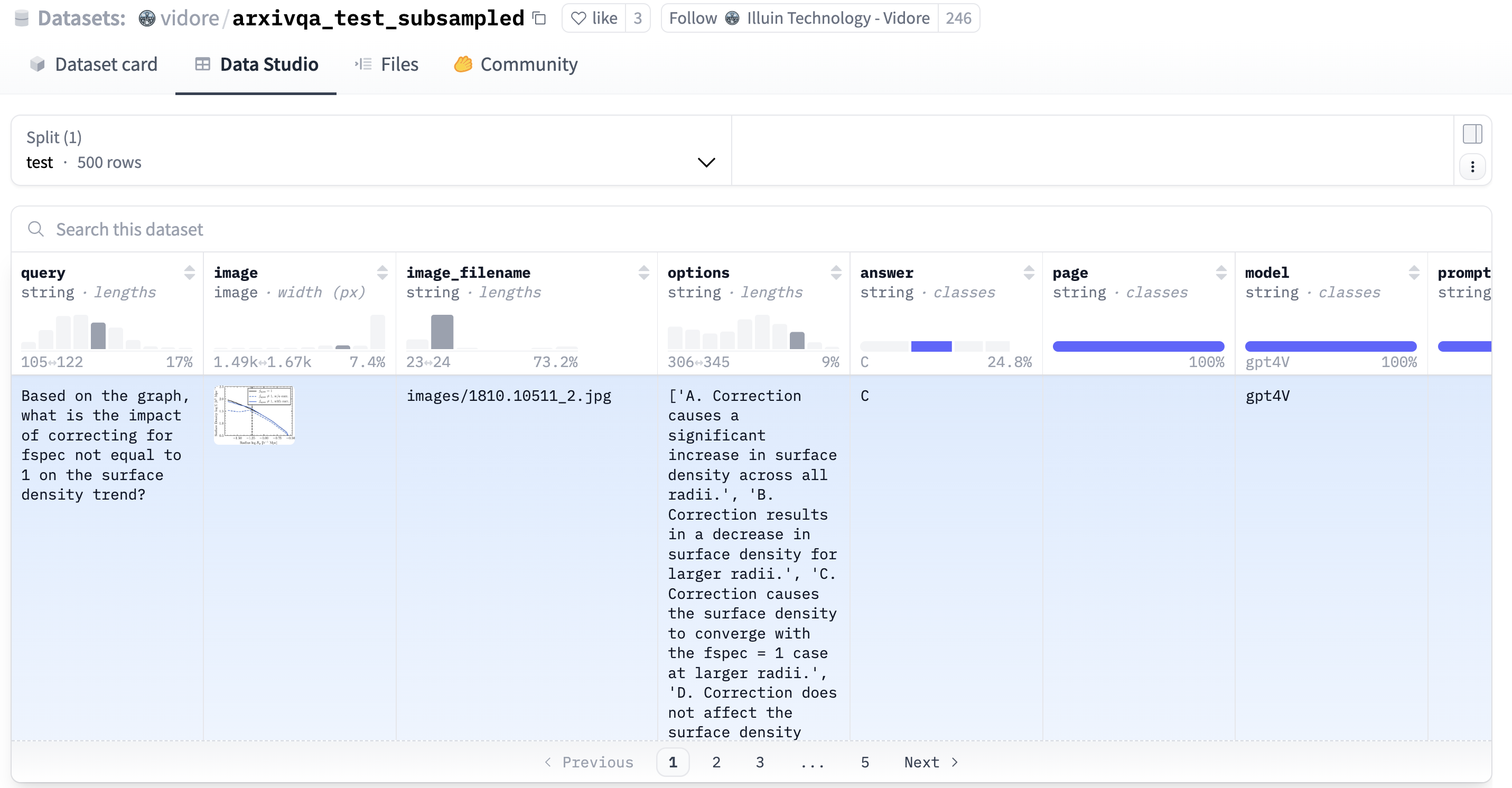
Running the evaluation script yields impressive results:
Analysis:
-
High Baseline Accuracy: First, let’s look at the baseline performance without WARP optimization. The system achieves an excellent NDCG@10 of 0.8615 and Recall@10 of 0.92. This confirms the fundamental effectiveness of ColQwen2 embeddings paired with VectorChord’s precise MaxSim search, delivering state-of-the-art results for visual document retrieval even without speed optimizations.
-
Dramatic WARP Speed Boost: Now, observe the impact of enabling VectorChord’s WARP optimization. The total execution time plummets from a substantial 810 seconds down to just 41 seconds! This represents a massive ~18.7x speedup for the evaluation query set. This clearly demonstrates WARP’s power in dramatically accelerating the computationally intensive MaxSim operations required for late-interaction models like ColQwen2.
-
Minimal Accuracy Trade-off: Impressively, this significant speed gain comes at the cost of only a very minor dip in retrieval accuracy. The NDCG@10 slightly decreases to 0.8353 (a difference of less than 0.3), and Recall@10 reduces minimally to 0.9 (a difference of only 0.02).
Conclusion: Visual RAG Made Simpler in Postgres
In this tutorial, we successfully built a high-performance, OCR-free RAG system by bringing together the visual understanding capabilities of ColQwen2, the scalable multi-vector search of VectorChord within PostgreSQL, and the efficient GPU processing of Modal. We saw how this stack allows us to directly query documents based on their visual content, bypassing the pitfalls of traditional OCR pipelines.
The ability to seamlessly integrate this visual dimension into your RAG system directly within Postgres opens up exciting possibilities for applications dealing with visually rich documents like scientific papers, invoices, product manuals, historical archives, and much more.
Ready to try it yourself?
-
Explore the Code: https://github.com/xieydd/vectorchord-colqwen2
-
Dive Deeper into VectorChord: Check out the VectorChord documentation or try the hassle-free VectorChord Cloud.
-
Experiment: Try different VLMs or datasets.
-
Share Your Thoughts: Let us know your experiences or questions in the comments below!
This approach represents a significant step towards simpler, more robust, and visually-aware document retrieval systems.