This is the multi-page printable view of this section. .
Getting Started
- 1: Overview
- 2: Installation
- 3: Vchord Suite
1 - Overview
vchord is a PostgreSQL extension designed for scalable, high-performance, and disk-efficient vector similarity search.
With vchord, you can store 400,000 vectors for just $1, enabling significant savings: 6x more vectors compared to Pinecone’s optimized storage and 26x more than pgvector/pgvecto.rs for the same price1. For further insights, check out our launch blog post.
Features
vchord introduces remarkable enhancements over pgvecto.rs and pgvector:
⚡ Enhanced Performance: Delivering optimized operations with up to 5x faster queries, 16x higher insert throughput, and 16x quicker1 index building compared to pgvector’s HNSW implementation.
💰 Affordable Vector Search: Query 100M 768-dimensional vectors using just 32GB of memory, achieving 35ms P50 latency with top10 recall@95%, helping you keep infrastructure costs down while maintaining high search quality.
🔌 Seamless Integration: Fully compatible with pgvector data types and syntax while providing optimal defaults out of the box - no manual parameter tuning needed. Just drop in vchord for enhanced performance.
🔧 Accelerated Index Build: Leverage IVF to build indexes externally (e.g., on GPU) for faster KMeans clustering, combined with RaBitQ2 compression to efficiently store vectors while maintaining search quality through autonomous reranking.
📏 Long Vector Support: Store and search vectors up to 60,0003 dimensions, enabling the use of the best high-dimensional models like text-embedding-3-large with ease.
🌐 Scale As You Want: Based on horizontal expansion, the query of 5M / 100M 768-dimensional vectors can be easily scaled to 10000+ QPS with top10 recall@90% at a competitive cost4
Quick Start
For new users, we recommend using the Docker image to get started quickly. If you do not prefer Docker, please read installation guide for other installation methods.
In addition to the base image with the VectorChord extension, we provide an all-in-one image,
tensorchord/vchord-suite:pg18-latest. This comprehensive image includes all official TensorChord extensions. Developers should select an image tag that is compatible with their extension’s version, as indicated in the support matrix.
Then you can connect to the database using the psql command line tool. The default username is postgres, and the default password is mysecretpassword.
Now you can play with VectorChord!
VectorChord depends on pgvector, including the vector representation. Since you can use them directly, your application can be easily migrated without pain!
Similar to pgvector, you can create a table with vector column and insert some rows to it.
With VectorChord, you can create vchordrq indexes.
And then perform a vector search using SELECT ... ORDER BY ... LIMIT ....
For more usage, please read:
- Indexing
- Multi-Vector Retrieval
- Graph Index
- Quantization Types
- Similarity Filter
- PostgreSQL Tuning
- Monitoring
- Fallback Parameters
- Measure Recall
- Prewarm
- Prefilter
- Prefetch
- Rerank in Table
- Partitioning Tuning
- External Build
License
vchord is licensed under the GNU Affero General Public License v3.0 (AGPL-3.0-only). We welcome any commercial collaboration or support inquiries—please email us at [email protected] with any questions.
-
Based on MyScale Benchmark with 768-dimensional vectors and 95% recall. Please check out our blog post for more details. ↩︎ ↩︎
-
Gao, Jianyang, and Cheng Long. “RaBitQ: Quantizing High-Dimensional Vectors with a Theoretical Error Bound for Approximate Nearest Neighbor Search.” Proceedings of the ACM on Management of Data 2.3 (2024): 1-27. ↩︎
-
There is a limitation at pgvector of 16,000 dimensions now. If you really have a large dimension(
16,000<dim<60,000), consider changing VECTOR_MAX_DIM and compile pgvector yourself. ↩︎ -
Please check our blog post for more details, the PostgreSQL scalability is powered by CloudNative-PG. ↩︎
2 - Installation
VectorChord is tested on the following operating system:
- Ubuntu (x86_64, aarch64)
- MacOS (x86_64, aarch64)
- Windows (x86_64)
- Alpine Linux (x86_64, aarch64) 1
- Debian (powerpc64le, s390x, riscv64) 2
Please report a bug if you encounter issues on any of the above operating systems, or submit a feature request for additional platform support.
Docker
VectorChord Image

The easiest way to try VectorChord is to run it from a ready-to use Docker image.
- Launch a VectorChord container in Docker.
- Connect to the database using the
psqlcommand line tool. The default username ispostgres.
- Run the following SQL to ensure the extension is enabled.
To achieve full performance, please mount the volume to PostgreSQL data directory by adding the option like:
-v $PWD/pgdata:/var/lib/postgresql/18/docker, on PostgreSQL 18-v $PWD/pgdata:/var/lib/postgresql/data, on PostgreSQL 14, 15, 16 and 17
You can configure PostgreSQL by the reference of the parent image in https://hub.docker.com/_/postgres/.
VectorChord Suite Image

In addition to the base image with the VectorChord extension, we provide an all-in-one image, tensorchord/vchord-suite:pg18-latest. This comprehensive image includes all official TensorChord extensions. Developers should select an image tag that is compatible with their extension’s version, as indicated in the support matrix.
- Launch a VectorChord container in Docker.
Other sections may align with the above.
VectorChord Scratch Image

We provide a scratch image that contains only the files of VectorChord. You can install VectorChord in any image using Docker’s COPY, like
This image can also be used as a CloudNativePG image volume extension. See also
Source
Build requirements:
- any port of
make clang >= 16withlibclangrust >= 1.93withcargo
It’s recommended to use Rustup for installing Rust on most platforms, while on Alpine Linux, using the system package manager is advised.
You can set the environment variable CC to specify the desired C compiler for the build system. If you do not set this variable, the build system automatically searches for clang and gcc. To compile all C code with clang, set CC to the path of clang. To compile all C code with gcc, set CC to the path of gcc; note that in this case, there is a requirement gcc >= 14.
Rust version requirement is not a long-term guarantee; we will raise the required Rust version with each new release.
These build requirements apply only to x86_64 and aarch64. For all other architectures, including powerpc64le, s390x and riscv64, nightly Rust and latest Clang are required.
If you have not installed PostgreSQL yet, please install PostgreSQL. If you have not installed pgvector yet, you could install pgvector before the 3rd step.
- Download the source code, build and install it with
make.
- Configure your PostgreSQL by modifying the
shared_preload_librariesto include the extension. And then restart the PostgreSQL cluster.
- Run the following SQL to ensure the extension is enabled.
Tuning
VectorChord performs runtime CPU dispatch for SIMD code. If you want the compiler to optimize the whole program for a particular CPU, you could instruct it to generate code for that CPU.
To see all valid CPU options and the default CPU for your target triple, run:
To generate code for the host machine, run:
Please note that binaries generated with a specific target-cpu are not compatible with other CPUs.
You can also do it by using Cargo’s configuration.
Debian
If you have not installed PostgreSQL yet, please install PostgreSQL following https://www.postgresql.org/download/linux/debian/. If you have not installed pgvector yet, you could install pgvector by apt install postgresql-18-pgvector before the 3rd step.
New VectorChord releases are hosted at github.com/pgsty/vchord/releases, while historical releases (1.1.1 and earlier) remain available at github.com/tensorchord/VectorChord/releases.
- Download Debian packages in the release page, and install them by
apt.
- Configure your PostgreSQL by modifying the
shared_preload_librariesto include the extension. And then restart the PostgreSQL cluster.
- Run the following SQL to ensure the extension is enabled.
Ubuntu
If you have not installed PostgreSQL yet, please install PostgreSQL following https://www.postgresql.org/download/linux/ubuntu/. If you have not installed pgvector yet, you could install pgvector by apt install postgresql-18-pgvector before the 3rd step.
New VectorChord releases are hosted at github.com/pgsty/vchord/releases, while historical releases (1.1.1 and earlier) remain available at github.com/tensorchord/VectorChord/releases.
- Download Debian packages in the release page, and install them by
apt.
- Configure your PostgreSQL by modifying the
shared_preload_librariesto include the extension. And then restart the PostgreSQL cluster.
- Run the following SQL to ensure the extension is enabled.
PGXN
See Source for build requirements.
If you have not installed PostgreSQL yet, please install PostgreSQL. If you have not installed pgvector yet, you could install pgvector by pgrxclient install vector before the 3rd step.
- Install VectorChord from PostgreSQL Extension Network with:
- Configure your PostgreSQL by modifying the
shared_preload_librariesto include the extension. And then restart the PostgreSQL cluster.
- Run the following SQL to ensure the extension is enabled.
There is a broken VectorChord 0.4.1 package on PGXN. Please do not use it. Use version 0.4.2 or later instead.
Prebuilt binaries
deprecatedPrebuilt binaries may not match the PostgreSQL in ABI on your machine, which could cause silent errors. We strongly recommend that you build from source in this case.
If you have not installed PostgreSQL yet, please install PostgreSQL. If you have not installed pgvector yet, you could install pgvector before the 3rd step.
- Download prebuilt binaries in the release page, and repackage it referring to your distribution’s documentation. Then install it by system package manager. We do not recommend doing this, but if you wish, you can also manually copy the files to the system directory.
- Configure your PostgreSQL by modifying the
shared_preload_librariesto include the extension. And then restart the PostgreSQL cluster.
- Run the following SQL to ensure the extension is enabled.
-
VectorChord is tested with PostgreSQL 15 in
communityrepository, 16 and 17 inmainrepository on Alpine Linux 3.22. ↩︎ -
VectorChord is tested with PostgreSQL 13, 14, 15, 16, 17 and 18 in PostgreSQL’s official repository on
powerpc64le, and PostgreSQL 15 and 17 in Debian’s official repository ons390xandriscv64, with QEMU user space emulator. ↩︎
3 - Vchord Suite
Retrieval-Augmented Generation (RAG) is revolutionizing our interaction with vast datasets and language models. RAG systems offer more precise, contextually aware, and current answers by retrieving pertinent information before generating responses. Nonetheless, constructing robust, scalable, and efficient RAG pipelines poses considerable challenges, particularly for production use.
Many solutions feature complex architectures, using distinct databases for vector search, keyword search, and primary data storage. This commonly results in data synchronization challenges, greater infrastructure complexity, and higher operational costs.
What if you could build a powerful, production-ready RAG system directly within your trusted PostgreSQL database?
Enter the Vchord Suite, a collection of PostgreSQL extensions designed to bring high-performance vector search, native BM25 ranking, and flexible tokenization capabilities right into Postgres. Let’s explore the components and how they enable next-generation RAG solutions.
What is the Vchord Suite?
The suite comprises three key PostgreSQL extensions working in concert:
-
vchord(pgsty/vchord): The core vector search engine. It’s specifically designed for scalable, high-performance, and disk-efficient vector similarity search within PostgreSQL. -
vchord_bm25(pgsty/vchord_bm25): This extension implements the sophisticated BM25 ranking algorithm directly inside PostgreSQL, leveraging efficient Block-WeakAnd algorithms. BM25 is a standard for relevance ranking based on keyword frequency and document characteristics. -
pg_tokenizer(pgsty/pg_tokenizer): Provides essential text tokenization capabilities needed for effective full-text search, enabling fine-grained control over how text is processed for full-text search.
By combining these extensions, you unlock powerful capabilities for building advanced RAG systems entirely within PostgreSQL.
How to Use the Vchord Suite
You can use the tensorchord/vchord-suite Docker image to run multiple extensions which are provided by TensorChord. The image is based on the Docker official PostgreSQL image and includes the following extensions:
vchordpg_tokenizervchord_bm25vector
Use Cases for the Vchord Suite
Use Case 1: Powerful Hybrid Search with Native BM25 and vchord
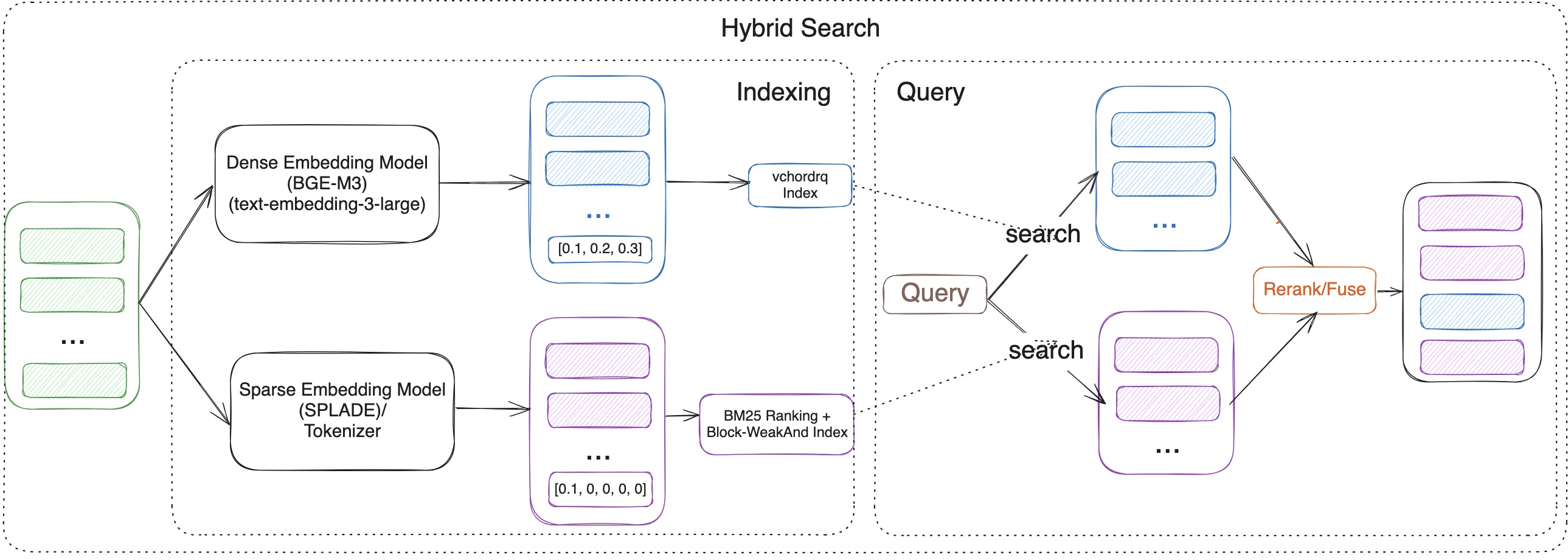
In the RAG era, effective retrieval is paramount. Neither keyword search nor vector search alone is perfect:
-
Keyword Search (like BM25): Excels at precision, finding documents with exact keyword matches. It’s great for structured queries and term-specific searches. However, it struggles with synonyms, paraphrasing, and understanding the underlying meaning or semantic intent. (Leverages
vchord_bm25andpg_tokenizer). -
Vector Search: Captures deep semantic meaning and relationships between concepts, allowing it to find relevant information even if the exact keywords aren’t present. However, it can sometimes lack precision for queries demanding specific term matches. (Leverages
vchord).
The Solution: Hybrid Search. By combining the strengths of both approaches within PostgreSQL, the Vchord Suite bridges this gap. You can run a query that leverages:
-
vchord_bm25(powered bypg_tokenizer) for keyword precision. -
vchordfor semantic understanding.
The results from both can be intelligently combined (e.g., using reciprocal rank fusion - RRF or Model-based rerank) to produce a final ranking that is more accurate, contextually relevant, and semantically aware than either method could achieve alone. This delivers significantly better retrieval performance for your RAG applications.
Use Case 2: Beyond Text - OCR-Free RAG with ColQwen2 & vchord
Building RAG systems for documents like PDFs or scanned images often involves cumbersome pre-processing pipelines. Traditional methods rely heavily on Optical Character Recognition (OCR) and layout analysis to extract text. This process can be:
-
Slow: OCR can be computationally expensive.
-
Error-Prone: OCR accuracy varies significantly depending on document quality.
-
Lossy: Crucial visual contexts like tables, figures, formatting, and relative positioning is often lost during text extraction.
The Solution: OCR-Free, Visually-Aware RAG. What if you could query documents based on how they look and their content, without explicit OCR?
This is now achievable by combining:
-
Multi-Modal Vision Language Models (VLMs): Models like ColQwen2 can process images (document pages) and generate embeddings that capture both textual content and visual layout information.
-
vchord’s Multi-Vector Capabilities:vchordcan efficiently store and search multiple vectors per document within PostgreSQL – allowing you to store embeddings representing different aspects (e.g., text content, visual layout).
With this setup, you can query your document database using prompts that reference visual elements (“Find documents with a bar chart comparing sales figures”) or combined textual and visual cues, directly within PostgreSQL. This simplifies your RAG stack, potentially boosts retrieval accuracy by preserving visual context, and eliminates the bottlenecks associated with traditional OCR pipelines.
Why Build RAG in PostgreSQL?
Leveraging the Vchord Suite within PostgreSQL offers significant advantages:
-
Unified Data: Keep your source data, text, metadata, and vector embeddings all in one place.
-
Reduced Complexity: Eliminate the need for separate vector databases and synchronization pipelines.
-
Leverage Existing Infrastructure: Utilize your existing PostgreSQL expertise, tooling, and operational practices.
-
Transactional Integrity: Benefit from PostgreSQL’s robust ACID compliance.
-
Rich Ecosystem: Access the wide array of tools and features available within the PostgreSQL ecosystem.
Conclusion
The Vchord Suite transforms PostgreSQL into a powerful, production-ready platform for building advanced RAG solutions. By integrating high-performance vector search (vchord), sophisticated keyword ranking (vchord_bm25), and flexible text processing (pg_tokenizer), you can implement cutting-edge techniques like hybrid search and OCR-free multi-modal retrieval directly within your database. Simplify your architecture, enhance retrieval accuracy, and unlock the full potential of RAG with Vchord in PostgreSQL.
Blog Posts
In our recent blog posts, we shared some user cases where all Docker images can be replaced with VectorChord Suite image.