This is the multi-page printable view of this section. .
Vector Types
- 1: Half-Precision Vector: `vecf16`
- 2: 8-Bit Integer Vector: `veci8`
- 3: Sparse Vector: `svector`
- 4: Binary Vector: `bvector`
In the previous sections Indexing and Search, we encountered the vector type. This section will explore additional vector types and their applications in the realm of vector search.
- Half-Precision Vector
- 8-Bit Integer Vector since v0.3.0
- Sparse Vector since v0.3.0
- Binary Vector since v0.3.0
Low-precision Indexing
since v0.3.0To improve the speed of queries on the vector column, consider creating a low-precision index using vecf16, veci8, or bvector types instead of a vector type.
Shortening Embedding
since v0.3.0Certain embedding models like OpenAI text-embedding-3-small support shortening embeddings, which involves removing some numbers from the end of the sequence without losing the embedding’s concept-representing properties.
In some cases, it may be necessary to change the embedding dimension after generation. The pgvecto.rs offers an approach to query by shortened embeddings.
Shortened embeddings are supported by all data types in pgvecto.rs since version v0.3.0.
Casts
This diagram shows the conversion between different data types, where the types connected by arrows can be cast to each other:
Among them, ARRAY is a native type of postgreSQL, others are types defined by pgvecto.rs.
Here are some examples of vector type casting:
1 - Half-Precision Vector: `vecf16`
Stored as a half-precision number format, vecf16 takes advantage of the 16-bit float, which uses half the memory and bandwidth compared to vector.
Here’s an example of creating a table with a vecf16 column and inserting values:
Index can be created on vecf16 type as well.
We support three operators to calculate the distance between two vecf16 values.
<->(vecf16_l2_ops): squared Euclidean distance, defined as .<#>(vecf16_dot_ops): negative dot product, defined as .<=>(vecf16_cos_ops): cosine distance, defined as .
2 - 8-Bit Integer Vector: `veci8`
Int8 is a data type used to represent signed integers. It stands for “integer 8-bit” and typically uses 8 bits of memory to store a value. This allows it to represent integer values ranging from -128 to 127.
Since each element in the vector only requires 8 bits (1 byte) of memory, veci8 can help reduce the overall memory footprint of your program.
Here’s an example of creating a table with a veci8 column and inserting values:
Index can be created on veci8 type as well.
We support three operators to calculate the distance between two veci8 values.
<->(veci8_l2_ops): squared Euclidean distance, defined as .<#>(veci8_dot_ops): negative dot product, defined as .<=>(veci8_cos_ops): cosine distance, defined as .
3 - Sparse Vector: `svector`
Unlike dense vectors, sparse vectors are very high-dimensional but contain few non-zero values.
Typically, sparse vectors can be created from:
- Word co-occurrence matrices
- Term frequency-inverse document frequency (TF-IDF) vectors
- User-item interaction matrices
- Network adjacency matrices
Sparse vectors in pgvecto.rs are called svector.
Here’s an example of creating a table with a svector column and inserting values:
Index can be created on svector type as well.
We support three operators to calculate the distance between two svector values.
<->(svector_l2_ops): squared Euclidean distance, defined as .<#>(svector_dot_ops): negative dot product, defined as .<=>(svector_cos_ops): cosine distance, defined as .
There is also a function to_svector to create a svector. It will set the value at the specified position.
4 - Binary Vector: `bvector`
The bvector type is a binary vector type in pgvecto.rs. It represents a binary vector, which is a vector where each component can take on two possible values, typically 0 and 1.
Here’s an example of creating a table with a bvector column and inserting values:
Index can be created on bvector type as well.
We support three operators to calculate the distance between two bvector values.
<->(bvector_l2_ops): squared Euclidean distance, defined as . The Hamming distance is equivalent to the squared Euclidean distance for binary vectors.<#>(bvector_dot_ops): negative dot product, defined as .<=>(bvector_cos_ops): cosine distance, defined as .<~>(bvector_jaccard_ops): Jaccard distance, defined as .
There is also a function binarize to build bvector from vector. It truncates vector elements to integers of 0 or 1.
Performance
The bvector type is optimized for storage and performance. It uses a bit-packed representation to store the binary vector. The distance calculation is also optimized for binary vectors.
Here are some performance benchmarks for the bvector type. We use the dbpedia-entities-openai3-text-embedding-3-large-3072-1M dataset for the benchmark. The VM is n2-standard-8 (8 vCPUs, 32 GB memory) on Google Cloud.
We upsert 1M binary vectors into the table and then run a KNN query for each embedding. It only takes about 600MB memory to index 1M binary vectors, while the vector type takes about 18GB memory to index the same number of vectors.
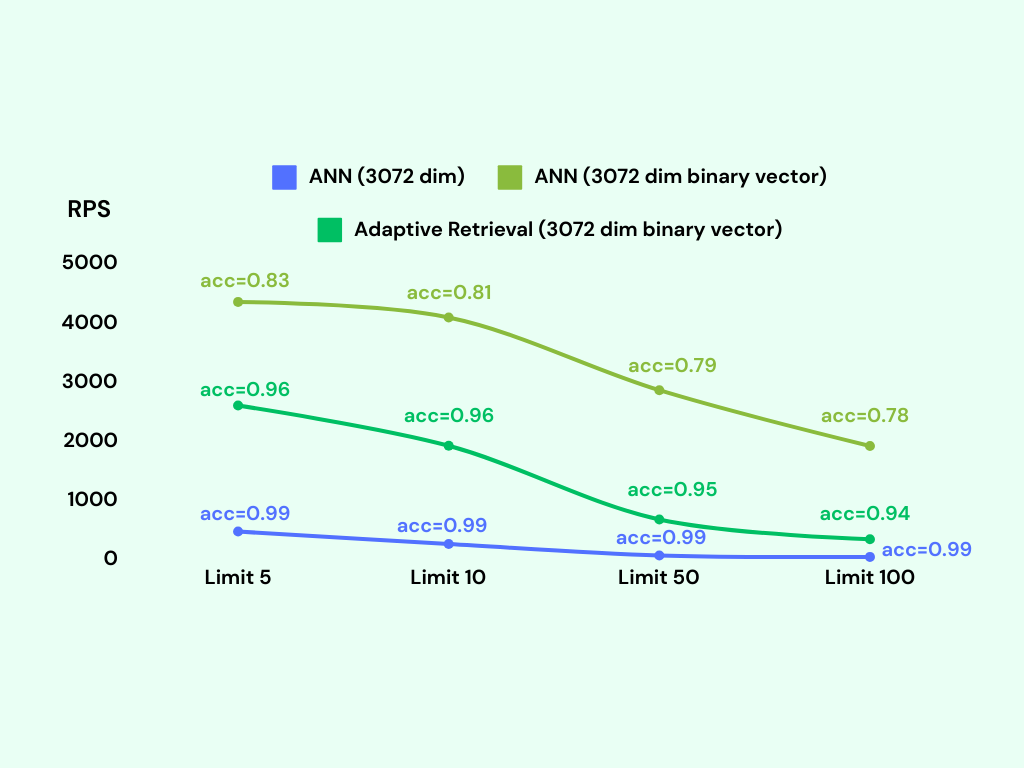
We can see that the bvector’s accuracy is not as good as the vector type, but it exceeds 95% if we adopt adaptive retrieval.