# Overview of the cloud object hierarchy
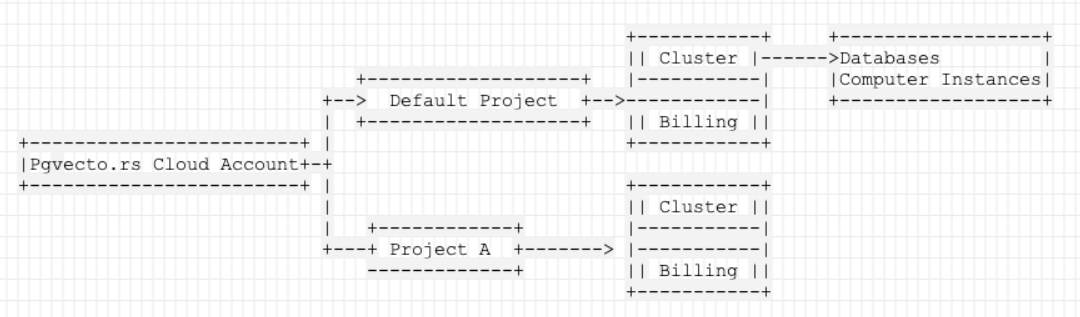
> Managing your VectorChord Cloud project requires an understanding of the object hierarchy. The following diagram shows how objects in cloud are related. See bel
---
LLMS index: [llms.txt](/llms.txt)
---
Managing your VectorChord Cloud project requires an understanding of the object hierarchy. The following diagram shows how objects in cloud are related. See below for a description of each object.
## VectorChord Cloud Account
This is the account you used to sign up with VectorChord Cloud. Now supports signing up with an GitHub account.
## Projects
A project is the top-level object in the hierarchy. It is a container for all clusters in the project and billing information. For more information, see [Projects](/cloud/manage/project/).
## Clusters
A project can contain one or more clusters. A cluster is a collection of nodes that run one `Postgres` cluster. For more information, see [Clusters](/cloud/manage/cluster/).
## Compute Instances
A cluster can contain one or more compute instances. A compute instance is a virtual machine that runs a `Postgres` instance.
## Databases
Every cluster contains two default databases: `postgres` and a database what you named when you created the cluster. You can create additional databases in a cluster with [psql](/cloud/connect/connect-with-psql/) after the cluster is ready.
---
Backlinks:
- [Authorization](/cloud/manage/authorization/)