SELECT'a fat cat sat on a mat and ate a fat rat'::tsvector@@'cat & rat'::tsquery;?column?----------
tSELECT'cat & rat'::tsquery@@'a fat cat sat on a mat and ate a fat rat'::tsvector;?column?----------
t
提示
如上例所示,tsquery 与 tsvector 一样,并不仅仅是原始文本。tsquery 包含必须已经规范化为词位(lexeme)的搜索词项,并且可以使用 AND、OR、NOT 以及 FOLLOWED BY 操作符组合多个词项。在本例中,tsquery'cat & rat' 与 tsvector'a fat cat sat on a mat and ate a fat rat' 匹配,因为文档中同时包含 'cat' 和 'rat' 两个词项。
CREATETABLEitems(idbigserialPRIMARYKEY,contenttextNOTNULL,embeddingvector(3)NOTNULL-- 3 维
);INSERTINTOitems(content,embedding)VALUES('a fat cat sat on a mat and ate a fat rat','[1, 2, 3]'),('a fat dog sat on a mat and ate a fat rat','[4, 5, 6]'),('a thin cat sat on a mat and ate a thin rat','[7, 8, 9]'),('a thin dog sat on a mat and ate a thin rat','[10, 11, 12]');
查询该表将得到如下内容:
postgres=# select * from items;
 id |                  content                   |  embedding
----+--------------------------------------------+--------------
  2 | a fat cat sat on a mat and ate a fat rat   | [1, 2, 3]
  3 | a fat dog sat on a mat and ate a fat rat   | [4, 5, 6]
  4 | a thin cat sat on a mat and ate a thin rat | [7, 8, 9]
  5 | a thin dog sat on a mat and ate a thin rat | [10, 11, 12]
(4 rows)
SELECTto_tsvector('english','a fat cat sat on a mat - it ate a fat rats');to_tsvector-----------------------------------------------------
'ate':9'cat':3'fat':2,11'mat':7'rat':12'sat':4
                  content                   | embedding
--------------------------------------------+-----------
 a fat cat sat on a mat and ate a fat rat   | [1, 2, 3]
 a thin cat sat on a mat and ate a thin rat | [7, 8, 9]
(2 rows)
                  content                   | embedding
--------------------------------------------+-----------
 a thin cat sat on a mat and ate a thin rat | [7, 8, 9]
 a fat cat sat on a mat and ate a fat rat   | [1, 2, 3]
(2 rows)
 id |                  content                   |  embedding   |          rank
----+--------------------------------------------+--------------+------------------------
  4 | a thin cat sat on a mat and ate a thin rat | [7, 8, 9]    | 1.00000000000000000000
  2 | a fat cat sat on a mat and ate a fat rat   | [1, 2, 3]    | 0.70000000000000000000
  3 | a fat dog sat on a mat and ate a fat rat   | [4, 5, 6]    | 0.33333333333333333333
  5 | a thin dog sat on a mat and ate a thin rat | [10, 11, 12] | 0.33333333333333333333
(4 rows)
# pip install -U psycopgimportpsycopgURL="postgresql://postgres:mysecretpassword@localhost:5432/postgres"withpsycopg.connect(URL)asconn:conn.execute("DROP TABLE IF EXISTS documents;")conn.execute(f"""
CREATE TABLE documents (
id SERIAL PRIMARY KEY,
text TEXT NOT NULL,
dense vector(1024) NOT NULL,
sparse svector({len(model.tokenizer)}) NOT NULL);
""")
表创建完成后,我们可以将嵌入向量插入表中,并为两个向量列分别创建索引:
# pip install -U pgvecto_rsimportpsycopgfrompgvecto_rs.psycopgimportregister_vectorURL="postgresql://postgres:mysecretpassword@localhost:5432/postgres"withpsycopg.connect(URL)asconn:register_vector(conn)fortext,dense,sparse_ind,sparse_valinzip(sentences,dense_embedding,sparse_indices,sparse_values):conn.execute("INSERT INTO documents (text, dense, sparse) VALUES (%s, %s, to_svector(%s, %s::real[]::int[], %s::real[]));",(text,dense,len(model.tokenizer),sparse_ind,sparse_val),)conn.execute("""
CREATE INDEX ON documents
USING vectors (sparse svector_dot_ops)
WITH (options = \"[indexing.hnsw]\");
""")conn.execute("""
CREATE INDEX ON documents
USING vectors (dense vector_l2_ops)
WITH (options = \"[indexing.hnsw]\");
""")
dense_embedding,sparse_indices,sparse_values=embedding("The text you want to search...")withpsycopg.connect(URL)asconn:register_vector(conn)cur=conn.execute("SELECT text FROM documents ORDER BY sparse <#> to_svector(%s, %s::real[]::int[], %s::real[]) LIMIT 50;",(len(model.tokenizer),sparse_indices,sparse_values),)sparse_result=cur.fetchall()cur=conn.execute("SELECT text FROM documents ORDER BY dense <-> %s LIMIT 50;",(dense_embedding,),)dense_result=cur.fetchall()# 合并稀疏向量与稠密向量的搜索结果mix_text=set([r[0]forrindense_result]).union([r[0]forrinsparse_result])
fromFlagEmbeddingimportFlagRerankerreranker=FlagReranker('BAAI/bge-reranker-large',use_fp16=True)# 获取相关性得分(得分越高表示相关性越强)scores=reranker.compute_score([["The text you want to search...",candidate]forcandidateinmix_text])# 对结合了稠密嵌入与稀疏嵌入检索出的候选文本进行重排序reranked_text=[tfor_,tinsorted(zip(scores,mix_text))]
获取 api_key 需要拥有 OpenAI 账号。登录后,可从右上角下拉菜单中申请 API 密钥,并将其粘贴替换代码中的 YOUR_API_KEY_HERE。
让我们先提问一部知名度较高的电影:
base_prompt="What is the release year and overall plot of Skyfall?"print(complete(base_prompt))
输出:
The release year of Skyfall is 2012. The overall plot follows James Bond as he investigates an attack on MI6 and uncovers a sinister plot by a former agent seeking revenge on M and the entire agency. Bond must confront his past and protect MI6 from destruction.
回答相当准确,尽管剧情简介略微笼统。但是,如果换作一部知名度低得多的电影呢?
base_prompt_2="What is the release year and overall plot of Cat Napping?"print(complete(base_prompt_2))
输出:
The release year of Cat Napping is unknown. The overall plot of Cat Napping is about a group of cats who go on a mission to rescue their friend who has been kidnapped by a group of evil dogs. Along the way, they encounter various challenges and obstacles, but with their cleverness and teamwork, they are able to save their friend and defeat the dogs.
正确答案:
《Cat Napping》(猫咪午睡)实际上是 1951 年上映的一部《猫和老鼠》(Tom and Jerry)动画短片,讲述了汤姆和杰瑞争夺一张吊床的故事。
让我们使用 Hugging Face 上的 vishnupriyavr/wiki-movie-plots-with-summaries-faiss-embeddings 数据集构建一个电影知识库,以便从中检索相关信息。该数据集包含 33,155 部电影的片名、上映年份、演员阵容、维基百科页面、剧情简介/长度,以及这些信息的向量嵌入(Vector Embeddings)。每部电影还包含一个综合了片名、上映年份、演员阵容和剧情简介的 text 字段。在本应用中,我们将使用其中的 text 和 embeddings 数据。
加载数据
首先加载数据集:
# pip install -U datasetsfromdatasetsimportload_datasetdataset=load_dataset("vishnupriyavr/wiki-movie-plots-with-summaries-faiss-embeddings",split='train')texts=dataset['train']['text']# texts[0]# 'Alice in Wonderland \n starring May Clark \n released in the year1903 \n with the following plot \n Alice follows a large white rabbit down a "Rabbit-hole". She finds a tiny door. When she finds a bottle labeled "Drink me", she does, and shrinks, but not enough to pass through the door. She then eats something labeled "Eat me" and grows larger. She finds a fan when enables her to shrink enough to get into the "Garden" and try to get a "Dog" to play with her. She enters the "White Rabbit\'s tiny House," but suddenly resumes her normal size. In order to get out, she has to use the "magic fan."\r\nShe enters a kitchen, in which there is a cook and a woman holding a baby. She persuades the woman to give her the child and takes the infant outside after the cook starts throwing things around. The baby then turns into a pig and squirms out of her grip. "The Duchess\'s Cheshire Cat" appears and disappears a couple of times to Alice and directs her to the Mad Hatter\'s "Mad Tea-Party." After a while, she leaves.\r\nThe Queen invites Alice to join the "ROYAL PROCESSION": a parade of marching playing cards and others headed by the White Rabbit. When Alice "unintentionally offends the Queen", the latter summons the "Executioner". Alice "boxes the ears", then flees when all the playing cards come for her. Then she wakes up and realizes it was all a dream.'
生成向量嵌入
由于该数据集自带了向量嵌入,您可以跳过生成步骤,直接使用现成的嵌入数据:
embeddings=dataset['train']['embeddings']
如果您希望从文本数据生成向量嵌入,可以使用 OpenAI、Cohere 或其他嵌入 API。下面我们提供一个使用 Cohere API 的示例(您可以在此处获取 Cohere API 密钥):
# pip install cohereimportgetpassimportosimportcohereifnotos.getenv("COHERE_API_KEY"):os.environ["COHERE_API_KEY"]=getpass.getpass("Enter your Cohere API key: ")co=cohere.Client()# 嵌入模型可参考此文档:https://docs.cohere.com/docs/cohere-embedembed=co.embed(texts=texts,input_type="search_query",model="embed-english-v3.0")embeddings=embed.embeddings
#pip install "psycopg[binary,pool]"importpsycopgURL="postgresql://postgres:mysecretpassword@localhost:5432/postgres"# 启用扩展withpsycopg.connect(URL)asconn:conn.execute("DROP EXTENSION IF EXISTS vectors;")conn.execute("CREATE EXTENSION vectors;")
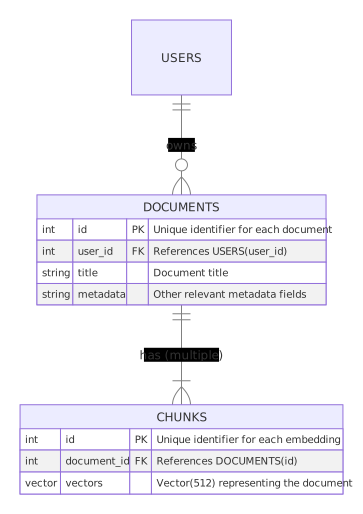
现在,我们创建一张名为 movies 的表,包含三个列:ID 列(id)、文本列(text)和向量列(embedding)。
importpsycopgURL="postgresql://postgres:mysecretpassword@localhost:5432/postgres"# 创建表withpsycopg.connect(URL)asconn:conn.execute("DROP TABLE IF EXISTS movies;")conn.execute(f"""
CREATE TABLE movies (
id SERIAL PRIMARY KEY,
text TEXT NOT NULL,
embedding vector(768) NOT NULL);
""")
说明
由于我们处理的是稠密向量嵌入,因此使用 vector(n) 类型,其中 n 是每个嵌入向量的维度(本例中为 768)。
表创建完成后,我们可以将数据集中的嵌入插入表中:
# 可选安装,但推荐使用以显示进度条:# pip install tqdmimportpsycopgfromtqdmimporttqdmURL="postgresql://postgres:mysecretpassword@localhost:5432/postgres"# 插入数据到表中withpsycopg.connect(URL)asconn:withconn.cursor()ascursor:fortext,embeddingintqdm(zip(texts,embeddings),total=len(texts)):cursor.execute("""INSERT INTO movies (text, embedding)
VALUES (%s, %s::real[]);""",(text,embedding),)conn.commit()
警告
根据待插入数据量的大小,此过程可能需要花费一些时间。
创建索引
importpsycopgURL="postgresql://postgres:mysecretpassword@localhost:5432/postgres"# 为 embedding 列创建索引withpsycopg.connect(URL)asconn:cursor=conn.cursor()cursor.execute("""
CREATE INDEX ON movies
USING vectors (embedding vector_l2_ops)
WITH (options = \"[indexing.hnsw]\");
""")conn.commit()
importpsycopgURL="postgresql://postgres:mysecretpassword@localhost:5432/postgres"defadd_context(prompt):search_vector=encode_query(prompt).tolist()# 构造包含检索上下文的提示词prompt_start=("Answer the question based on the following context:\n\n")prompt_end=(f"\n\nQuestion: {prompt}\nAnswer:")withpsycopg.connect(URL)asconn:cursor=conn.cursor()# 根据希望提供给模型的电影文本数量调整 LIMIT 值cursor.execute("SELECT text FROM movies ORDER BY embedding <-> %s::real[] LIMIT 3;",(search_vector,),)result=cursor.fetchall()context=""forrinresult:context+=r[0]+"\n\n"returnprompt_start+context+prompt_end
base_prompt_2="What is the release year and overall plot of Cat Napping?"context_prompt_2=add_context(base_prompt_2)context_response_2=complete(context_prompt_2)print(context_response_2)
输出:
The release year of Cat Napping is 1951 and the overall plot involves Tom and Jerry fighting over a hammock, with Jerry ultimately getting revenge on Tom.
现在模型给出了准确的回答!我们甚至可以针对细节进一步追问:
base_prompt_3="In Cat Napping, what does Tom do to Jerry?"print(complete(add_context(base_prompt_3)))
输出:
Tom tries to send Jerry sliding into a nearby pond by unhooking the hammock he is sleeping in. He also tries to whack the hammock to send Jerry flying into the air, but Jerry lands in a bird’s nest. Tom then picks Jerry up on a spatula and places him onto a walking army of ants, causing Jerry to wake up as he bumps his head on a sprinkler. Tom also tries to chase Jerry with a lawn mower and a baseball bat.